12 of the 201 stores (6.0%) had a checkout a shopper could not finish. Every one of them failed the same way again when I went back at least 24 hours later. All 12 homepages loaded normally.
The most common failure was also the quietest. Six stores showed a normal-looking checkout with a Place order button and no way to pay: no card form, no PayPal, nothing, just a line saying there are no payment methods available. A shopper who has typed in their name and address gets there and leaves.
Half the stores came from WordPress agencies' own portfolios; half were a random draw of WooCommerce sites from the HTTP Archive. The full method, the rules I wrote down before the first visit and the anonymised data are below. No store is named.
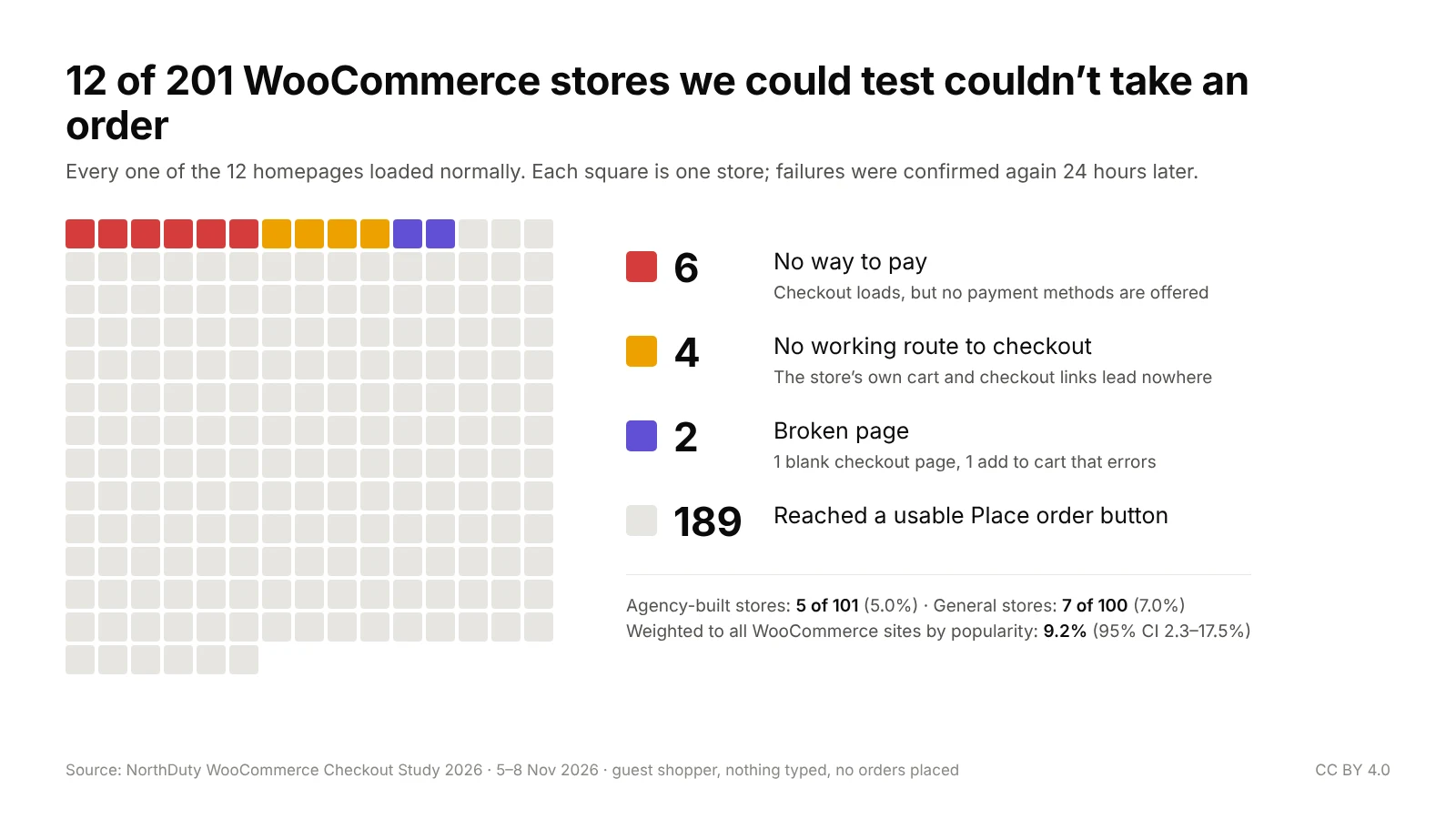
The numbers
| Measure | Result |
|---|---|
| Stores we could test | 201 |
| Stores where a guest could not get to a usable Place order button | 12 (6.0%) |
| Of those, homepage loaded normally | 12 of 12 |
| Visits | 5 to 8 November 2026 |
| Couldn't take an order | Rate | 95% confidence interval | |
|---|---|---|---|
| Agency-built stores | 5 of 101 | 5.0% | 2.1–11.1% |
| General WooCommerce stores (HTTP Archive), as sampled | 7 of 100 | 7.0% | 3.4–13.7% |
| General WooCommerce stores, weighted to the whole population | 9.2% | 2.3–17.5% | |
| All stores tested | 12 of 201 | 6.0% | 3.4–10.1% |
The weighted figure is the best estimate for WooCommerce sites in general. I sampled the same number of stores from each of four popularity groups (by Chrome UX Report rank), so the busiest sites are over-represented in the raw count. Re-weighting each group to its real share of the roughly 970,000 WooCommerce sites in the crawl gives 9.2%, about one store in eleven, with a wide margin because each group's sample is small.
Download the anonymised data (CSV).
What went wrong
| Where the shopper got stuck | Stores |
|---|---|
| Checkout loads, but no payment methods are offered | 6 |
| No working link from the cart to checkout | 4 |
| Checkout page is blank | 1 |
| Add to cart returns a server error | 1 |
| Place order missing, locked for no reason or covered | 0 |
| Total | 12 of 201 |
No way to pay (6 stores)
This was the biggest group by far, and none of it shows from the outside. The checkout page loads, the form is there, the order summary is right, and the Place order button looks clickable. Where the payment methods should be, WooCommerce prints its fallback message: "Sorry, it seems that there are no available payment methods", or on the newer block checkout, "There are no payment methods available". I waited 20 seconds, reloaded, and checked again the next day. Same result each time.
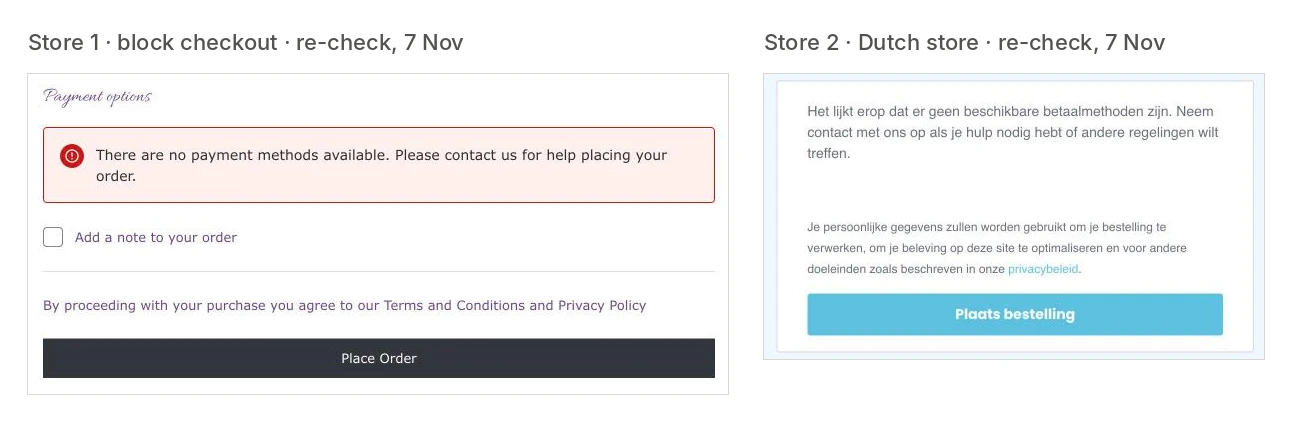
Some of these are striking. One shop's cart promises iDEAL, Bancontact and Klarna, and its checkout then offers none of them. A made-to-measure product went into the cart at its base price with its size fields empty and then had nowhere to go. A cooking school's online course, a training provider's enrolment product and a nursery's webshop all ended at the same message.
WooCommerce shows that message when no payment gateway is enabled and available for the order: a gateway switched off after a test, a plugin licence that lapsed, rules that hide every method for a country, an amount or a product type. I can't tell you which it was for each store, only that a guest buying that product from that country got no way to pay.
No working route from the cart to checkout (4 stores)
On four stores, adding to cart worked, and then nothing the store offered led to checkout:
- every cart and checkout link, including the mini-cart's own Checkout button and "Buy now", sent the shopper back to the homepage;
- the bag icon opened a "page not found" quote list, and there was no cart link anywhere else;
- the only "View cart" link sat underneath a breadcrumb box that covered it, and the header cart opened an empty panel;
- the "View basket" link was hidden under a page section, and the header had no basket at all.
In all four, the cart and checkout pages exist and work if you type the address in. A shopper doesn't do that. They see that the item went into the cart and can't find the way to pay for it.
A broken page (2 stores)
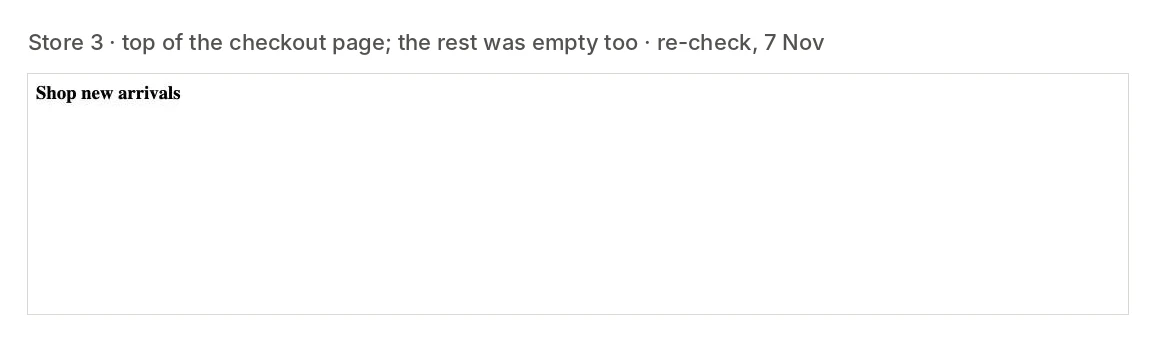
One store's checkout page returned a near-empty fragment of a page, a three-word promotional heading and nothing else, whether I came from the side cart, the cart page or a phone-width window.
Another store's Add to cart button returned a server error (HTTP 500) and left the cart empty; by the next day, the product page itself was returning a 500.
The failure I expected and didn't find
I expected the classic: a chat bubble, cookie bar or sticky banner sitting on top of the Place order button. On 201 stores it didn't happen once. Popups did get in the way earlier: a newsletter box or late cookie banner swallowed the first click on several stores. But a shopper can close those, so I closed them and carried on, and they count as friction below, not failures.
Agency-built stores vs everyone else
Agency-built stores failed at 5.0%, general stores at 7.0%. That difference is well within what chance alone produces at this sample size (difference −2.0 points, 95% CI −9.4 to +5.0; Fisher's exact test p = 0.57). This study can't tell you that agency-built stores are healthier, and I am not going to claim it.
One check I committed to in advance: about a quarter of the agencies were on my list because I had once seen a broken page on one of their client sites, which could bias the agency half towards failure. Their stores failed at 4.0% (1 of 25), the rest at 5.3% (4 of 76). That is no meaningful difference, so the agency figure above uses all 101 stores.
On the 189 stores that worked
Reaching a usable Place order button is the bar for this study, not a smooth checkout. Here is what shoppers met on the way:
| On the stores that passed | All 189 | Agency | General |
|---|---|---|---|
| Payment methods offered (median) | 2 | 2 | 2 |
| Only one payment method | 38% | 36% | 39% |
| Offline payment only (bank transfer, cash on delivery, "we'll contact you") | 11% | 2% | 20% |
| Express buttons (Apple Pay, Google Pay, PayPal, Link) | 38% | 46% | 30% |
| Required terms checkbox | 28% | 30% | 26% |
| Phone number required | 25% | 24% | 26% |
| A box ticked for you (newsletter, account, ship elsewhere) | 18% | 23% | 13% |
| Popup or modal on the way (not counting cookie banners) | 17% | 22% | 13% |
| Cookie banner | at least 39% | 46% | 32% |
| PayPal or a wallet preselected, its button replacing Place order | 7% | 7% | 6% |
| Guest checkout not allowed (account password required) | 4% | 1% | 6% |
| A fee or extra item added (payment surcharge, auto-added line) | 3% | 1% | 4% |
The extra items include one store that quietly added a paid certificate to the basket next to the course I had chosen.
Read these as "at least": they come from the notes made on each visit, and the early visits recorded less detail than the later ones.
How to read the numbers
It's a floor. I tested one simple product per store, as a guest, in one country, with nothing typed in. Shoppers who choose sizes and colours, enter a delivery address, use a coupon or pay with a real card meet more ways for a checkout to fail. None of those were tested.
It's not a verdict on any one store. A checkout with no payment methods for my test may well work for a different product or country. That still means a real shopper hit a dead end.
The general-store estimate is wide. 9.2% weighted, with a 95% interval from 2.3% to 17.5%. I would quote it as "roughly one in eleven, plausibly anywhere from one in forty to one in six".
Some of the failures are on demo content. Three of the twelve stores (two with no way to pay, including the nursery, and one with no route to checkout) were selling a theme's placeholder products on a live, public shop. They count under the rules I wrote down before scoring, because a shopper can find them and add them to the cart. If you would rather leave them out, it's 9 of 198 (4.5%).
Some tests changed on the way. I wrote rules for every situation I could foresee before the first visit, and added clarifications as new situations came up, each one written down before the store it first applied to was scored. They are listed in the method.
Before Black Friday: check your own store in 15 minutes
- Open a private window and buy something the way a stranger would: product, add to cart, cart, checkout. Stop before paying, or use test mode.
- Look at the payment section, not just the button. If it says there are no payment methods available, check that your gateways are enabled, their API keys are live (not test), and no country, amount or product rule hides all of them.
- Use your own links to get from the cart to checkout: the notice after adding, the mini cart, the header cart icon. Not the URL bar.
- Do it again at phone width, and with your cookie banner and any popups still showing.
- Try a product that is a little unusual: a variable or custom-sized item, a digital download, a course.
- Repeat after every plugin, theme, gateway or hosting change, not just before the sale.
Stores I couldn't test
155 WooCommerce stores on the lists couldn't be tested. They count as "couldn't test", never as broken:
| Reason | Agency | General | Total |
|---|---|---|---|
| No simple, priced, in-stock product to buy (everything needs options, has no price, or the shop is empty) | 24 | 39 | 63 |
| Catalogue or enquiry site: WooCommerce installed, but no online buying | 13 | 25 | 38 |
| Checkout won't reach payment until personal details are typed in | 5 | 9 | 14 |
| Age check on arrival (alcohol, cannabis, vapes) | 7 | 4 | 11 |
| Account or personal details required before checkout | 1 | 10 | 11 |
| Bot challenge or blocked | 3 | 6 | 9 |
| Minimum order above one item | 3 | 1 | 4 |
| Prices hidden from guests | 0 | 2 | 2 |
| Coming soon or closed | 2 | 0 | 2 |
| Unreachable, twice, 24 hours apart | 0 | 1 | 1 |
The surprise here is how much of "WooCommerce" isn't a shop. A third of the general sites running WooCommerce (64 of 197) had nothing a guest could simply buy. Many use it as a product catalogue or a quote list.
Method
Question. When a guest shopper tries to buy from a live WooCommerce store, how often can't they get as far as paying, and why? "As far as paying" means a checkout where payment methods are shown and Place order can be clicked.
Two samples, both fixed before any visit. Agency-built: client stores named in the published portfolios of 401 WordPress and WooCommerce agencies in a list NorthDuty keeps for its own sales outreach, at most two stores per agency, in an order fixed by a hash of the agency name. General: a seeded random draw of root pages detected as WooCommerce in the HTTP Archive crawl of 1 October 2026 (mobile client), in four Chrome UX Report rank groups (top 100,000; 100,000–1 million; 1–10 million; over 10 million), visited one from each group in turn. For each list I went down in order until 100 stores could be tested, and report everything skipped on the way. One agency-built store couldn't be reached on its first visit and worked on its 24-hour retry, so that half has 101. In all, 449 stores were visited to reach the 201 that could be tested: 85 weren't running WooCommerce when visited, 8 were excluded on sight and 155 couldn't be tested (reasons above).
One visit. In Chrome on desktop at 1440 × 720 pixels: open the homepage (cookie banner: the most privacy-preserving option offered), take the first simple, in-stock, priced product from the public Store API (or the shop page if the API was blocked), add it to the cart once, open the cart, use the store's own checkout button, wait up to 20 seconds for payment methods, reload once if none appear, and check that Place order is visible, enabled and not covered at its centre or edges. If the store asked for a country before showing payment methods, I chose the store's own country and typed nothing else. Then the same from the cart at phone width (a 500-pixel-wide window, below every common mobile breakpoint); add to cart was not re-tested at that width.
Never done. No name, email, address, phone or card details typed. No order placed, no Pay or express-pay button clicked, no account created. No bot challenge, captcha or age gate answered.
Scoring (written before any data). Pass: payment methods shown and a usable Place order. Fail: add to cart fails (F1), the route from cart to checkout breaks (F2), the checkout page errors or is blank (F3), no way to pay (F4), or Place order missing, disabled with no reason given, or covered by something that can't be closed (F5). Couldn't test: bot challenges, geo-blocks, closed shops, no suitable product, prices hidden, accounts required, age gates and unreachable sites. Excluded on sight: adult, gambling and weapons stores.
Verification. Every failure was visited again at least 24 hours later at the same width, and counted only if the same failure happened again. All 12 did. Screenshots and a record of every step were saved at the first visit.
Rules added during the run. Each was written down before the store it first applied to was scored: a popup that takes the first click is closed and the click repeated; when PayPal or a wallet is preselected and shows its own button instead of Place order, that button counts as Place order; a button locked with the reason shown on screen ("agree to the terms first", "enter your address to see options") is friction, not a failure; checkouts that won't reach payment until details are typed are "couldn't test"; age checks only on some product pages mean skipping to the next product; a checkout that takes orders for later confirmation with no payment step is a pass with "no online payment" noted; a cart link covered by something the shopper can't close counts as a broken route (F2).
Browser. My everyday Chrome profile, not a clean one, logged out of every store visited. A visit where a store recognised me as logged in wouldn't have counted; no store did.
robots.txt. Most WooCommerce stores ask search crawlers not to index the cart and checkout pages. This study wasn't a crawl: one interactive shopper visit per store and width, about six page views, plus one re-visit for failures. That is lighter than a real shopper who browses, and nothing personal was entered, so no abandoned-cart emails could be triggered.
Not measured. I planned to report clicks from product to checkout, seconds until the checkout was usable, and console errors. They weren't recorded consistently across visits, so I have left them out rather than report partial numbers.
Pilot. Ten stores were visited before the run to test the rules. They are not counted and were removed from the sample.
Disclosure. I run NorthDuty, which sells checkout and user-journey monitoring. That is why every rule, exclusion and limit is written out here.
Using this data
- Data: anonymised CSV, one row per store visited, no names or addresses
- Chart: results chart (PNG, 1600 × 900)
- Licence: CC BY 4.0. Reuse it freely with credit to NorthDuty.
- Citation: NorthDuty, "We Tried to Buy From 201 WooCommerce Stores. 12 Couldn't Take an Order," visits 5–8 November 2026.
- One-line summary: "In November 2026, NorthDuty went through checkout as a guest on 201 live WooCommerce stores; 12 (6%) had a checkout a shopper couldn't finish, most often because no payment method was offered, and all 12 homepages loaded normally."
Journalists and editors: I have dated screenshots for each failure and can walk you through them privately. Store owners and agencies: if you want to know whether your store was in the sample and what I saw, get in touch and I'll send it over, free and with no pitch.
Corrections. If you find an error, tell me. Corrections will be shown here with the date.
If one of these is yours
Fix it, then put a real test purchase through. A homepage that loads tells you the site is up, not that anyone can pay.
That gap is what I built NorthDuty for. Journey monitoring walks a buying path on a schedule, through the cart to the payment step, and tells you which step failed.