Send formatted alerts to any inbox or mailing list, with the threshold, the observed value, and a direct link back to the project dashboard.
Alerting & Notifications
When a website health signal crosses a threshold, NorthDuty delivers the alert to every channel your team already watches — email, Slack, Microsoft Teams, Discord, Google Chat, custom webhooks, Telegram, WhatsApp, and SMS.
Start your 7-day trial — no credit card, free plan after.
Get an alert when a configured check detects a failure, with the result your team needs to investigate.
Notification channels NorthDuty delivers to
Add as many channels as you need per project, enable or disable each one independently, and route the same alert rules to all of them.
Slack, Teams, Discord & Google Chat
Post alerts straight into the chat tools your team already lives in. Paste an incoming webhook URL and NorthDuty formats a rich message for each platform.
Custom webhooks
Receive every alert as clean JSON at your own HTTPS endpoint to trigger PagerDuty, an internal tool, or any automation you run.
Telegram, WhatsApp & SMS
Ping a Telegram chat for lightweight alerts, message a WhatsApp number, or text an on-call phone over SMS for the alerts that can't wait for someone to check a screen.
Alerts start from the rules you set
Notification channels deliver whatever your alert rules detect, so every message carries the threshold and the observed value that triggered it.
Alert Rules
Turn website health signals into alert thresholds
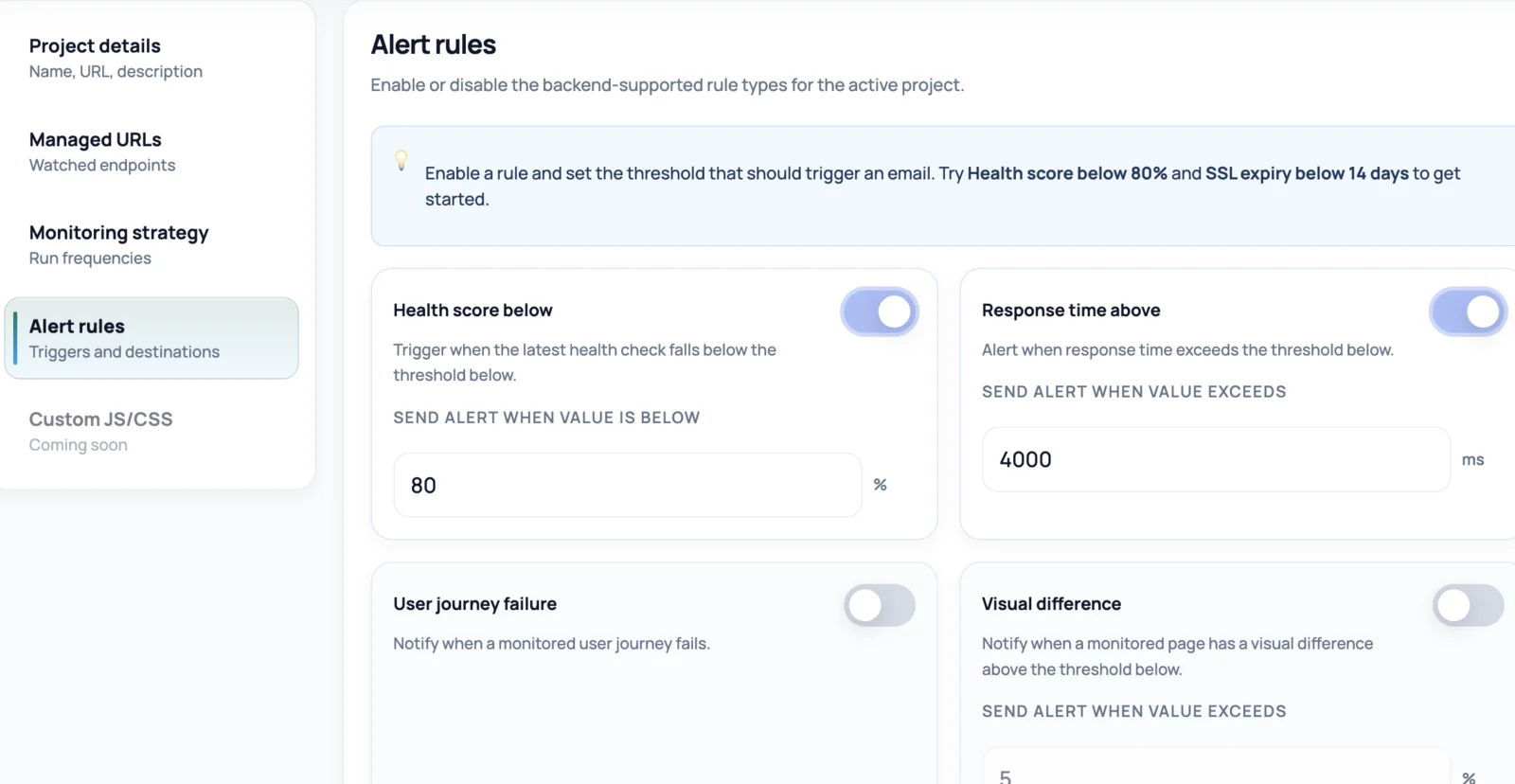
Configure alerts for health score, response time, failed journeys, SSL expiry, and other website reliability signals.
One alert, every channel your team uses
NorthDuty evaluates alert rules on every result — health score, response time, failed user journeys, and SSL expiry — and fans the alert out to all notification channels you've enabled on a project. You configure the destinations once; NorthDuty handles delivery.
Each project can mix channels freely: email a stakeholder list, post to a Slack incident channel, push to Microsoft Teams or Discord, hit a custom webhook for your own automation, ping a Telegram or WhatsApp chat, and text an on-call phone over SMS — all from the same alert. A built-in cooldown keeps a flapping signal from spamming every channel.
Why multi-channel alerting matters
An alert nobody sees is the same as no alert. Routing each signal to the right place gets the right person to respond faster.
- Reach people where they already work instead of asking them to watch a dashboard
- Send urgent failures to SMS or Telegram while routine warnings stay in chat or email
- Fan a single alert rule out to several channels and teams at once
- Plug NorthDuty into existing incident tooling through custom webhooks
- Avoid alert fatigue with a per-rule cooldown that suppresses repeat notifications
How NorthDuty alerting works
Configure rules and channels once per project; delivery runs automatically from there.
1
Set alert rules with thresholds
Choose the signals that matter — health score, response time, journey failures, SSL expiry — and the threshold for each.
2
Add notification channels
Add the destinations your team uses: an email address, a Slack or Teams or Discord webhook URL, a Google Chat space, a custom HTTPS endpoint, a Telegram chat, or a phone number for SMS.
3
Alerts deliver everywhere at once
When a rule is breached, NorthDuty sends the alert to every enabled channel for that project, each formatted for its platform.
4
Cooldown prevents alert spam
A built-in cooldown holds back repeat notifications for the same rule, so a flapping signal doesn't bury your team in messages.
Related NorthDuty Pages
Explore pricing, feature details, solution pages, and related tools connected to this website monitoring use case.
Pricing
Pricing
NorthDuty plans are sized by how many checkout, signup and login journeys you monitor: Free, $29 Starter, $79 Pro, $199 Business. 7-day trial, no card.
Compare pricing plansHub
Features
Explore NorthDuty features: coverage-aware AI journeys, a cross-site workspace overview, website health checks, and connected incident response.
Browse FeaturesHub
Solutions
Explore NorthDuty solutions for ecommerce website monitoring, SaaS website monitoring, agency website monitoring, and startup website monitoring.
Browse SolutionsFeature
Website Monitoring
Learn how NorthDuty combines editable user journeys and website health checks in one website monitoring project.
Explore Website MonitoringFeature
Uptime Monitoring
Monitor uptime every 5 minutes by default with HTTP, SSL, DNS, blank-page detection, broken resources, JavaScript errors, and API call tracking.
Explore Uptime MonitoringFeature
SSL Certificate Monitoring
Monitor SSL certificates with NorthDuty website health checks so validity, trust, and expiry issues are visible before visitors are blocked.
Explore SSL Certificate MonitoringFeature
Website Performance Monitoring
Monitor website performance signals, response timing, and rendering context on the pages and journeys that affect revenue, leads, and trust.
Explore Website Performance MonitoringFeature
User Journey Monitoring
NorthDuty runs your checkout, signup, login and form flows in a real browser on a schedule and reports the exact step that failed, with a screenshot.
Explore User Journey MonitoringFrequently Asked Questions
Answers to common questions about this monitoring feature and when teams should use it.
Which notification channels does NorthDuty support?
Email, Slack, Microsoft Teams, Discord, Google Chat, custom HTTPS webhooks, Telegram, WhatsApp, and SMS. You can enable any combination of them per project.
Can one alert go to more than one channel?
Yes. NorthDuty sends every breached alert rule to all of the enabled notification channels on that project, so the same alert can reach email, chat, a webhook, and SMS at once.
How do I connect Slack, Teams, Discord, or Google Chat?
Create an incoming webhook URL in the chat tool and add it as a notification channel on your project. NorthDuty formats a rich message for each platform automatically.
Will I get spammed if a check keeps failing?
No. Each alert rule has a cooldown that suppresses repeat notifications for a set window, so a flapping signal sends one alert rather than a flood.
Start monitoring your website with NorthDuty today.
Route NorthDuty alerts to email, Slack, Teams, Discord, Google Chat, webhooks, Telegram, WhatsApp, and SMS — so the right people see website problems the moment they happen.
7 days with Pro features and limits, no credit card — then keep one daily journey on the free plan.