Uptime & website health
Every 5 minutes by default: HTTP status, SSL, DNS, response timing, blank-page detection, broken resources, JavaScript errors, and API call tracking — all in one check.
NorthDuty runs two layers of monitoring: user journeys that prove customers can still check out, sign up and log in, and uptime and website health underneath. A workspace overview then prioritizes health, journey failures, incidents, and deploys across every site.
Start your 7-day trial — no credit card, free plan after.
The plain-English version: what gets checked, how often, and why it matters.
Two layers, one project. Each cadence is configurable in project settings.
Every 5 minutes by default: HTTP status, SSL, DNS, response timing, blank-page detection, broken resources, JavaScript errors, and API call tracking — all in one check.
NorthDuty lists what customers do on your site, shows which ones nothing checks yet, and suggests journeys to cover them. Turn any on in one click, or describe your own multi-step flow in plain text — no code.
Review monitoring readiness, degraded sites, failing journeys, open incidents, and deploy activity across every project without opening sites one by one.
NorthDuty keeps uptime and user journey evidence in the same product surface, so every alert has context.
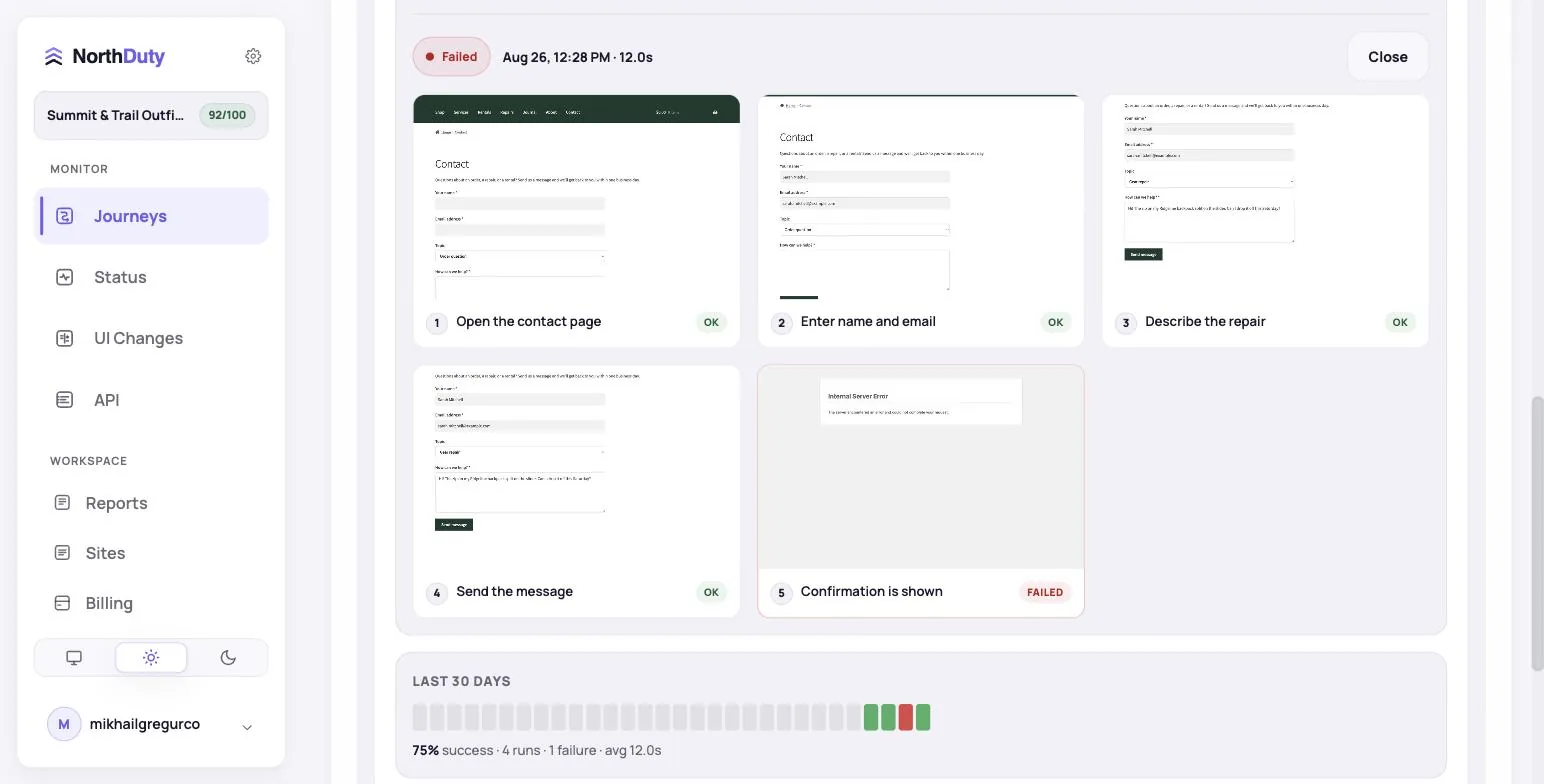
Journey coverage lists the key things customers do on the site, such as checkout, cart, search, bookings, and forms, with a plain status for each: monitored, failing, partly checked, ready to turn on, or not monitored. Every row has the one button that fixes it.
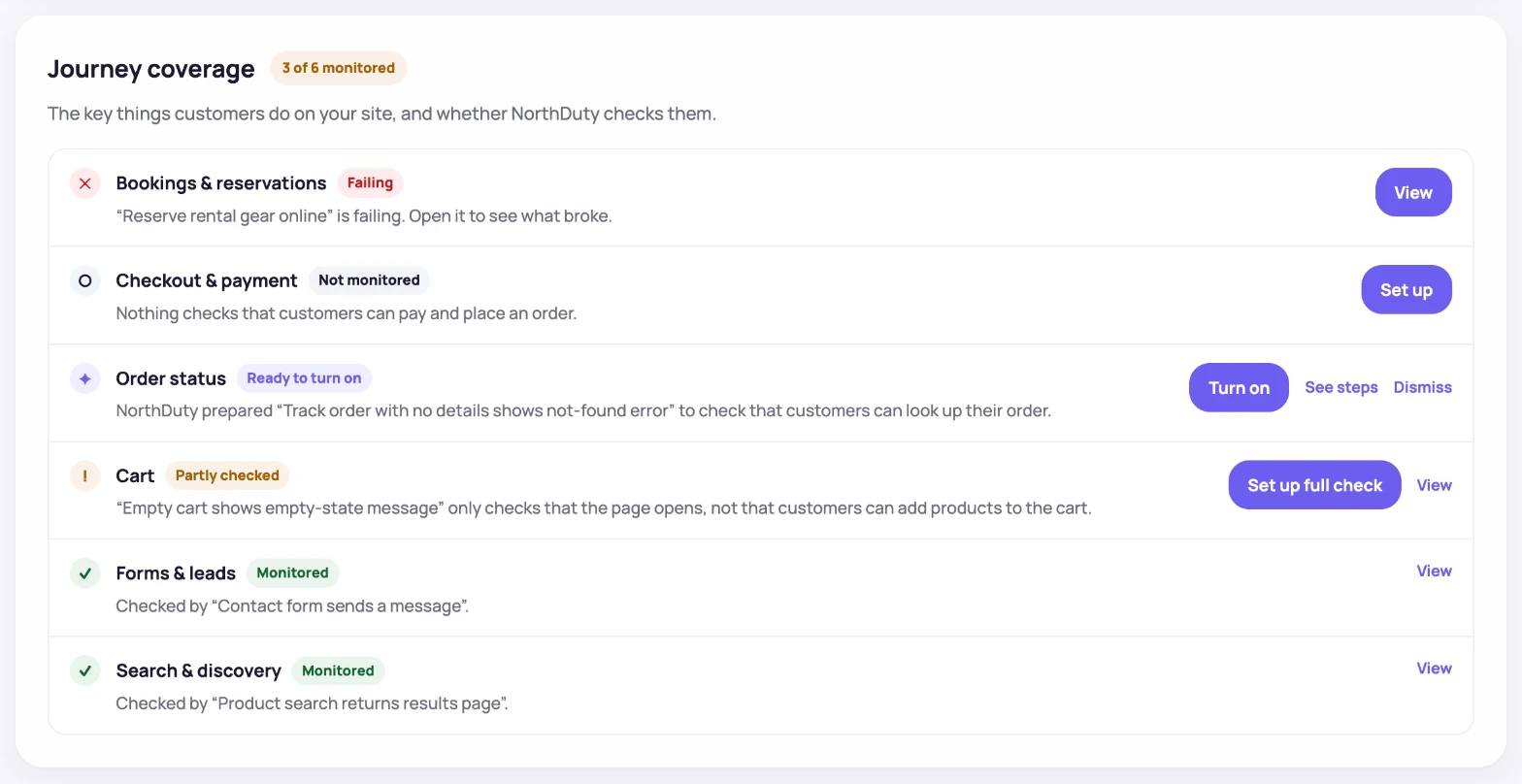
Configure alerts for health score, response time, failed journeys, SSL expiry, and other website reliability signals.
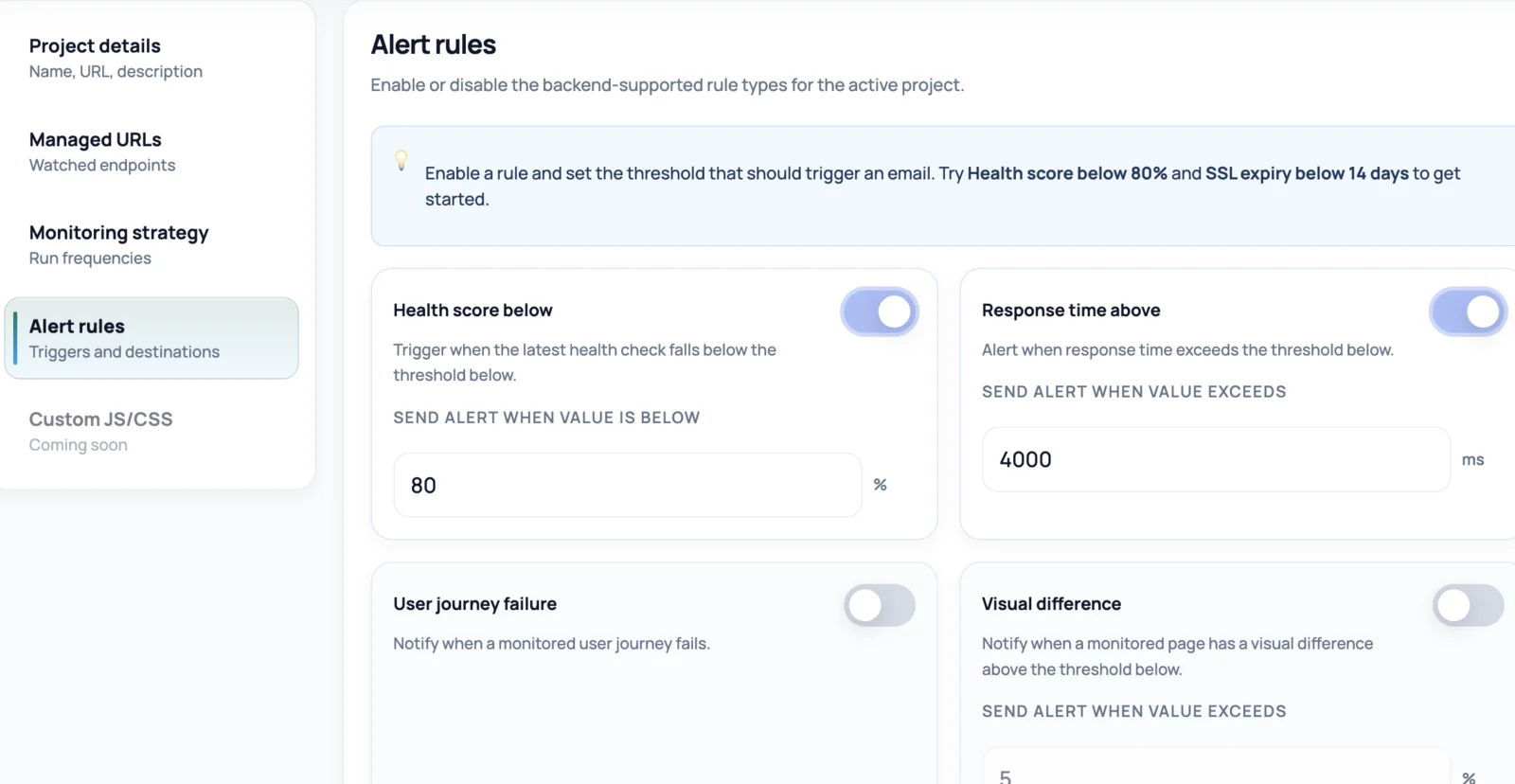
NorthDuty runs your contact and lead forms as a real user journey — open the page, fill the fields, submit — and keeps a step-by-step screenshot timeline so a failed submission is easy to pinpoint.
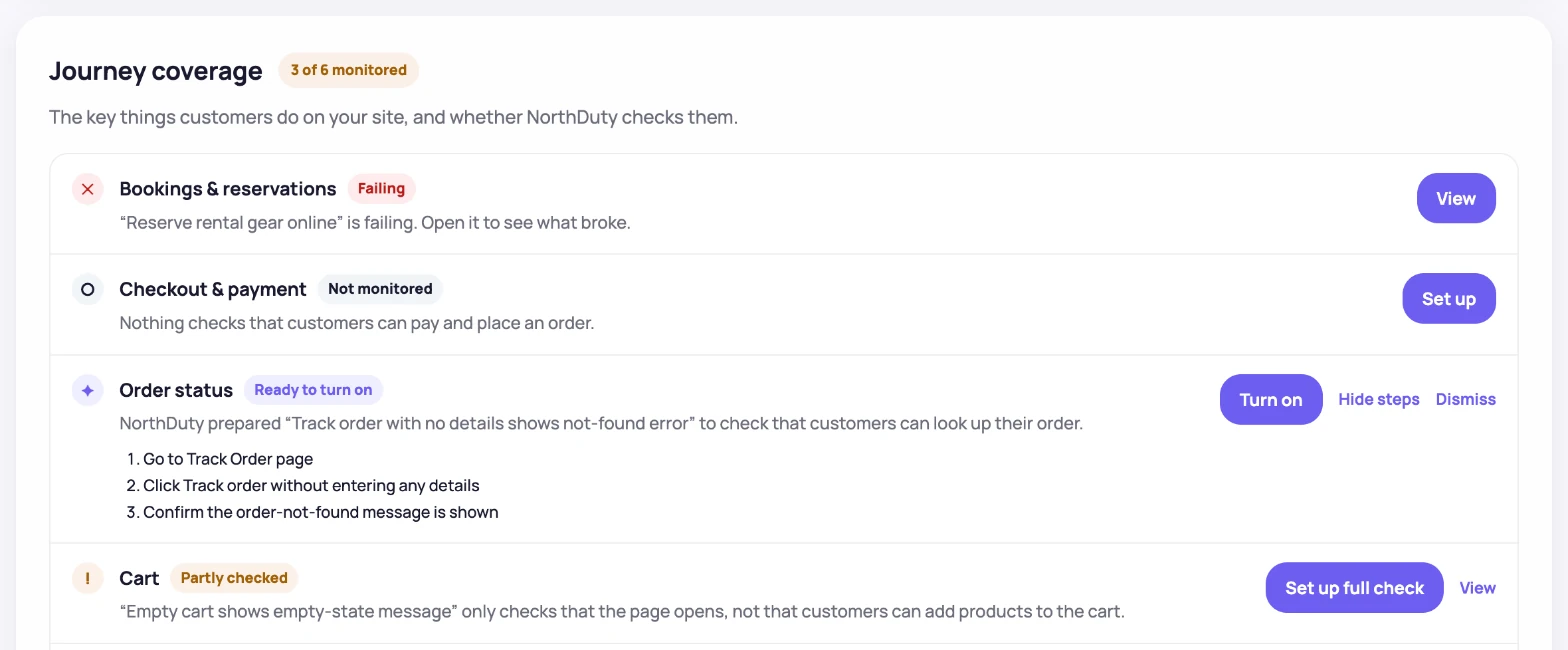
NorthDuty scans the site and prepares journeys with concrete steps. Each suggestion appears in the row it would cover, so you can read its steps and turn it on in one click, with no scripts.
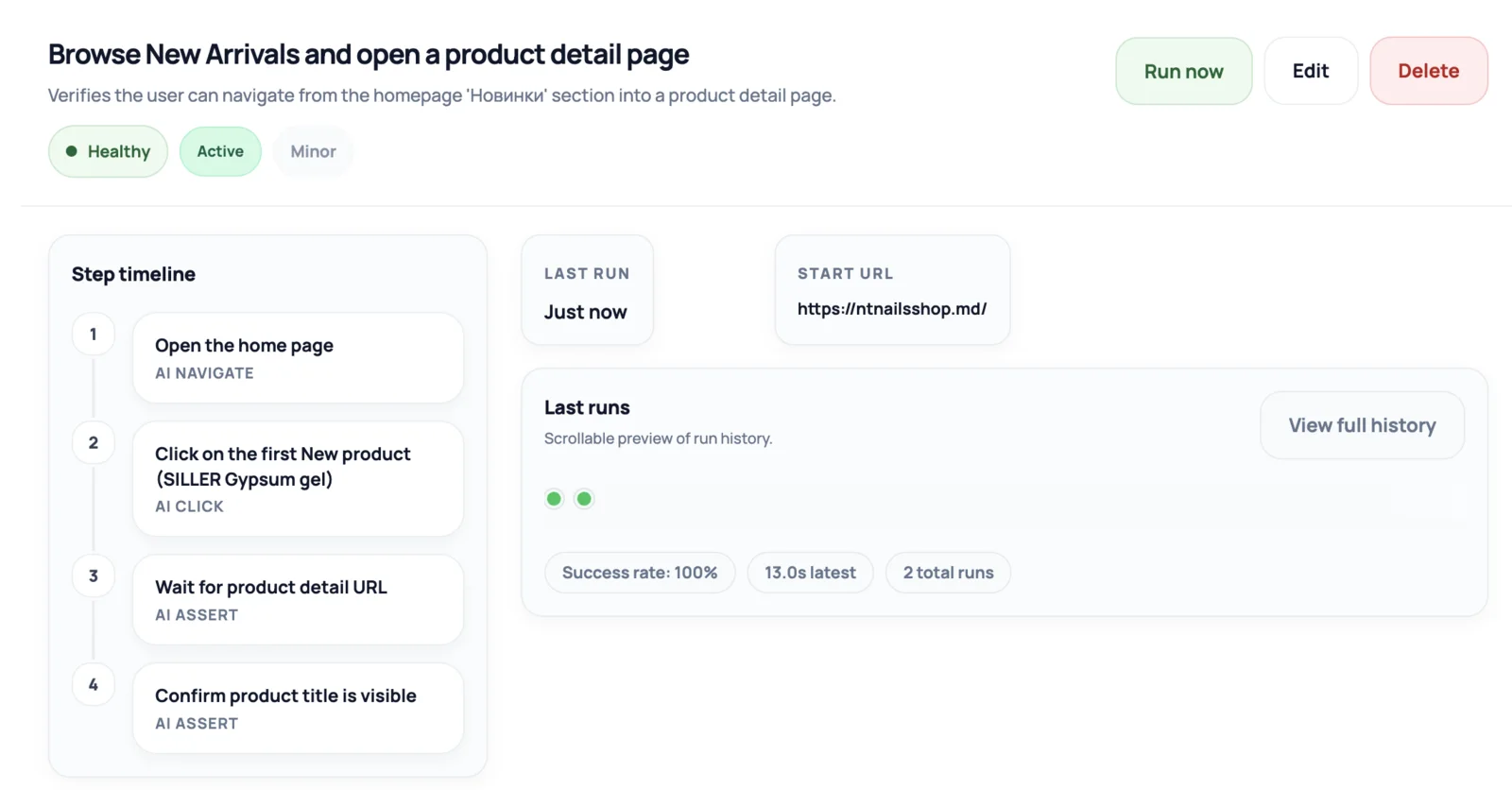
Each monitored journey keeps a step timeline, last run details, and success-rate context so teams can understand whether a flow is healthy.
Add a base URL and NorthDuty sets up a project around it. Website health monitoring starts running every 5 minutes by default, checking HTTP response, SSL, DNS, blank pages, broken resources, JavaScript errors, and first-party API calls in a single pass. You can adjust the cadence in project settings.
On top of that, NorthDuty AI suggests user journeys — checkout, signup, login, contact forms — that you can enable in one click or replace with flows described in plain text. Each run happens in a real browser and keeps step screenshots.
Across the workspace, Overview brings every site's monitoring state, health, journeys, incidents, and recent deploy activity into one prioritized queue. First-check progress and completion live there, so setup guidance does not keep occupying the Status page after monitoring is ready.
Uptime alone misses silent regressions: a page can return 200 while checkout is broken. Journeys prove the flow works; health checks catch outages, SSL and DNS problems. Running both closes the gap.
Set up takes a few minutes; everything runs on a schedule from there.
Add your site's base URL and NorthDuty sets up a project around it, ready to discover important pages and routes.
Website health monitoring uses the default 5-minute cadence out of the box. Change the frequency to 1, 5, or 15 minutes in project settings without touching code.
NorthDuty lists what customers do on the site, shows what nothing checks yet, and suggests journeys for the most valuable gaps.
When a journey or health check fails, your team gets the evidence and can carry a detected finding directly into incident management.
Explore pricing, feature details, solution pages, and related tools connected to this website monitoring use case.
Pricing
NorthDuty plans are sized by how many checkout, signup and login journeys you monitor: Free, $29 Starter, $79 Pro, $199 Business. 7-day trial, no card.
Compare pricing plansHub
Explore NorthDuty features: coverage-aware AI journeys, a cross-site workspace overview, website health checks, and connected incident response.
Browse FeaturesHub
Explore NorthDuty solutions for ecommerce website monitoring, SaaS website monitoring, agency website monitoring, and startup website monitoring.
Browse SolutionsFeature
Automatically run health checks and user journeys the moment your site is deployed or your CMS publishes a change.
Explore Deployment MonitoringFeature
NorthDuty runs your checkout, signup, login and form flows in a real browser on a schedule and reports the exact step that failed, with a screenshot.
Explore User Journey MonitoringFeature
Monitor uptime every 5 minutes by default with HTTP, SSL, DNS, blank-page detection, broken resources, JavaScript errors, and API call tracking.
Explore Uptime MonitoringFeature
Monitor SSL certificates with NorthDuty website health checks so validity, trust, and expiry issues are visible before visitors are blocked.
Explore SSL Certificate MonitoringFeature
Monitor DNS resolution with NorthDuty as part of website health checks, so domain and resolution issues are visible before important pages become unreachable.
Explore DNS MonitoringFeature
Monitor website performance signals, response timing, and rendering context on the pages and journeys that affect revenue, leads, and trust.
Explore Website Performance MonitoringFeature
Monitor signup flows with NorthDuty user journeys so broken forms, missing CTAs, JavaScript errors, API failures, and onboarding issues are caught early.
Explore Signup Flow MonitoringFeature
Monitor login flows with NorthDuty user journeys so authentication pages, forms, JavaScript, APIs, and account-access steps keep working.
Explore Login MonitoringFeature
Run checkout and lead forms in a real browser on a schedule. Get the failed step and a screenshot when submission breaks. One daily journey is free.
Explore Form MonitoringFeature
Send NorthDuty alerts to email, Slack, Teams, Discord, Google Chat, webhooks, Telegram, WhatsApp, and SMS.
Explore AlertingAnswers to common questions about this monitoring feature and when teams should use it.
Website monitoring checks whether important pages and user journeys are available and usable for visitors. NorthDuty covers availability, page quality, and customer flows from a single project.
No. A page can return 200 OK while a button is missing, a form is broken, an API returns the wrong shape, or a checkout flow fails halfway through. NorthDuty pairs uptime with user journey checks to catch what status codes hide.
Website health runs every 5 minutes by default and is configurable in project settings, and user journeys can run daily, hourly, or every 15, 10 or 5 minutes depending on the plan.
No. NorthDuty analyzes the site's customer capabilities, suggests journeys for uncovered paths, and lets you enable them in one click. You can also describe a custom journey in plain text — no code, no Playwright scripts.
Use NorthDuty to monitor user journeys and uptime from one project — health checks start with your base URL, and the deeper layers are ready to configure.
7 days with Pro features and limits, no credit card — then keep one daily journey on the free plan.