Content & copy edits
Surfaces edited headlines, pricing changes, swapped hero sections, and navigation changes — whether they were intentional or slipped in with another change.
NorthDuty captures a screenshot of each monitored page on a schedule and compares it pixel-by-pixel against the previous capture. When something changes — a moved button, edited copy, a new banner, or a broken layout — the change surfaces as a visual diff with a changed-percentage figure, so you find out before customers do.
Start your 7-day trial — no credit card, free plan after.
Get alerted when a page changes — intended or not — without writing a single test.
Useful anywhere a visible change to a page can affect conversions, trust, or compliance.
Surfaces edited headlines, pricing changes, swapped hero sections, and navigation changes — whether they were intentional or slipped in with another change.
Detects moved or missing buttons, broken grids, overlapping elements, and spacing changes that appear after a deploy or CMS push.
The differ aligns content even when a banner is added or removed and the rest of the page moves down — so a single insertion does not flag the whole page as changed.
Managed URL screenshot sets let you watch more than the base URL, so change detection can cover the handful of pages that matter most.
The UI Changes view shows the monitored URL, the previous screenshot, the diff overlay, and the changed percentage.
Changed regions are outlined over a dimmed version of the page, with unchanged areas faded back, so you can read what moved at a glance and open the full capture when you need detail.
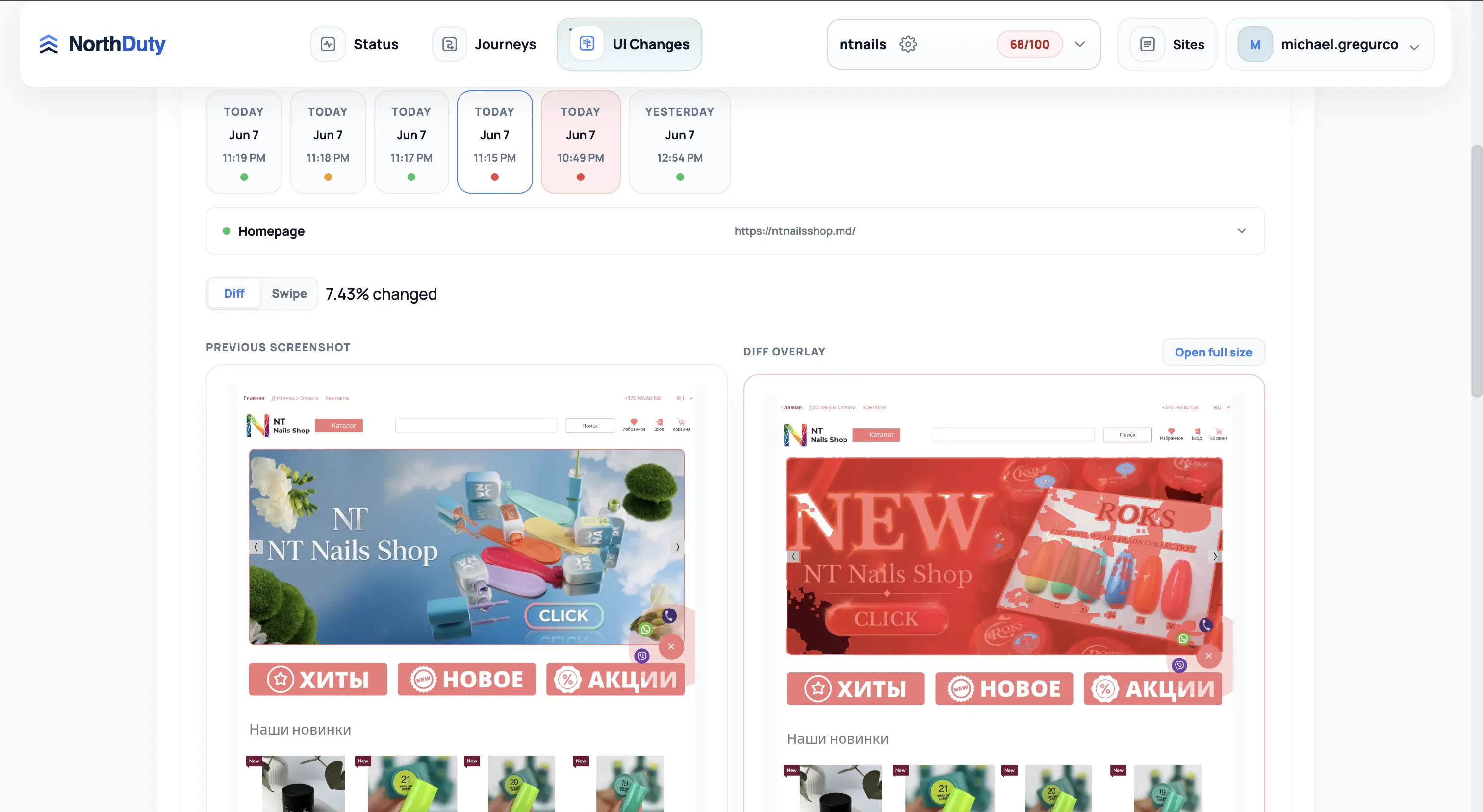
Pages change for reasons no uptime check can see: a CMS edit, a deploy, a plugin update, a third-party script, or an A/B test. Most of those changes are intentional, but some are not — and the unintended ones are the ones that quietly cost conversions.
Instead of asking you to maintain code, NorthDuty does change detection from real browser screenshots. Each scheduled capture is stabilized first — cookie and consent overlays are removed, media and carousels are paused, lazy images are eager-loaded, and the page is scrolled in passes to trigger deferred content — so that two captures of an unchanged page diff cleanly and only real changes show up.
It catches the visible changes that matter without scripts, selectors, or per-element configuration.
It runs automatically once a project exists, with a configurable cadence.
NorthDuty captures the base URL and any managed URLs added for broader screenshot sets — no scripts to write.
On each run the page is stabilized and captured. The capture becomes the new candidate for comparison.
NorthDuty aligns the two captures, diffs them pixel-by-pixel, and reports the changed percentage with a diff overlay.
Open the diff to see what changed, then decide whether it was expected. Alert rules can notify you when the visual difference crosses a threshold.
Explore pricing, feature details, solution pages, and related tools connected to this website monitoring use case.
Pricing
NorthDuty plans are sized by how many checkout, signup, and login journeys you monitor: Free (1 daily journey), $29 Starter, $79 Pro, $199 Business, $499 Enterprise. 7-day full trial, no card.
Compare pricing plansHub
Explore NorthDuty features: website health checks every 5 minutes, screenshot-based visual change detection, and AI-suggested user journey monitoring in one project.
Browse FeaturesHub
Explore NorthDuty solutions for ecommerce website monitoring, SaaS website monitoring, agency website monitoring, and startup website monitoring.
Browse SolutionsFeature
Automatically run health checks, visual diffs, user journeys, and API monitors the moment your site is deployed or your CMS publishes a change.
Explore Deployment MonitoringFeature
Screenshot-based visual regression testing and website change detection for key pages — get pixel diffs on design, content, and layout changes, no code required.
Explore Visual Regression MonitoringFeature
Website screenshot monitoring with NorthDuty: scheduled, stabilized full-page captures of your key pages, stored over time and diffed against the previous baseline.
Explore Screenshot MonitoringFeature
Learn how NorthDuty combines health checks, screenshot diffs, and editable user journeys in one website monitoring project.
Explore Website MonitoringFeature
Send NorthDuty alerts to email, Slack, Teams, Discord, Google Chat, webhooks, Telegram, WhatsApp, and SMS.
Explore AlertingAnswers to common questions about this monitoring feature and when teams should use it.
Website change detection notices when a web page changes. NorthDuty does it by taking scheduled screenshots and comparing each one pixel-by-pixel against the previous capture, then reporting the changed percentage and a diff overlay.
No. NorthDuty compares full-page screenshots, so there is nothing to script. You add a URL and change detection runs automatically on a schedule.
NorthDuty stabilizes each page before capture and drops sub-8-pixel difference components as noise, and it aligns vertically shifted content, so routine rendering differences are far less likely to be reported as changes.
It is the same screenshot-and-diff engine framed for a different job. Visual regression monitoring focuses on catching regressions after releases; change detection focuses on knowing whenever a monitored page changes for any reason.
Add the pages that matter and let NorthDuty tell you, with a visual diff, the moment they change.
7 days with every feature unlocked, no credit card required — then keep monitoring on the free forever plan.