Real-browser health checks
Each check renders the page and records HTTP, SSL, DNS, blank-page detection, broken resources, JavaScript errors, and first-party API calls — not just a status code.
Synthetic monitoring proactively simulates real user activity against your site on a schedule, instead of waiting for real users to hit a problem. NorthDuty does this two ways: every health check renders the page in a real browser, and user journeys execute multi-step flows in headless Chromium — so you catch failures before customers do.
Start your 7-day trial — no credit card, free plan after.
Simulate real visits on a schedule and catch failures before customers do.
Two complementary layers: rendered single-page checks and multi-step journeys.
Each check renders the page and records HTTP, SSL, DNS, blank-page detection, broken resources, JavaScript errors, and first-party API calls — not just a status code.
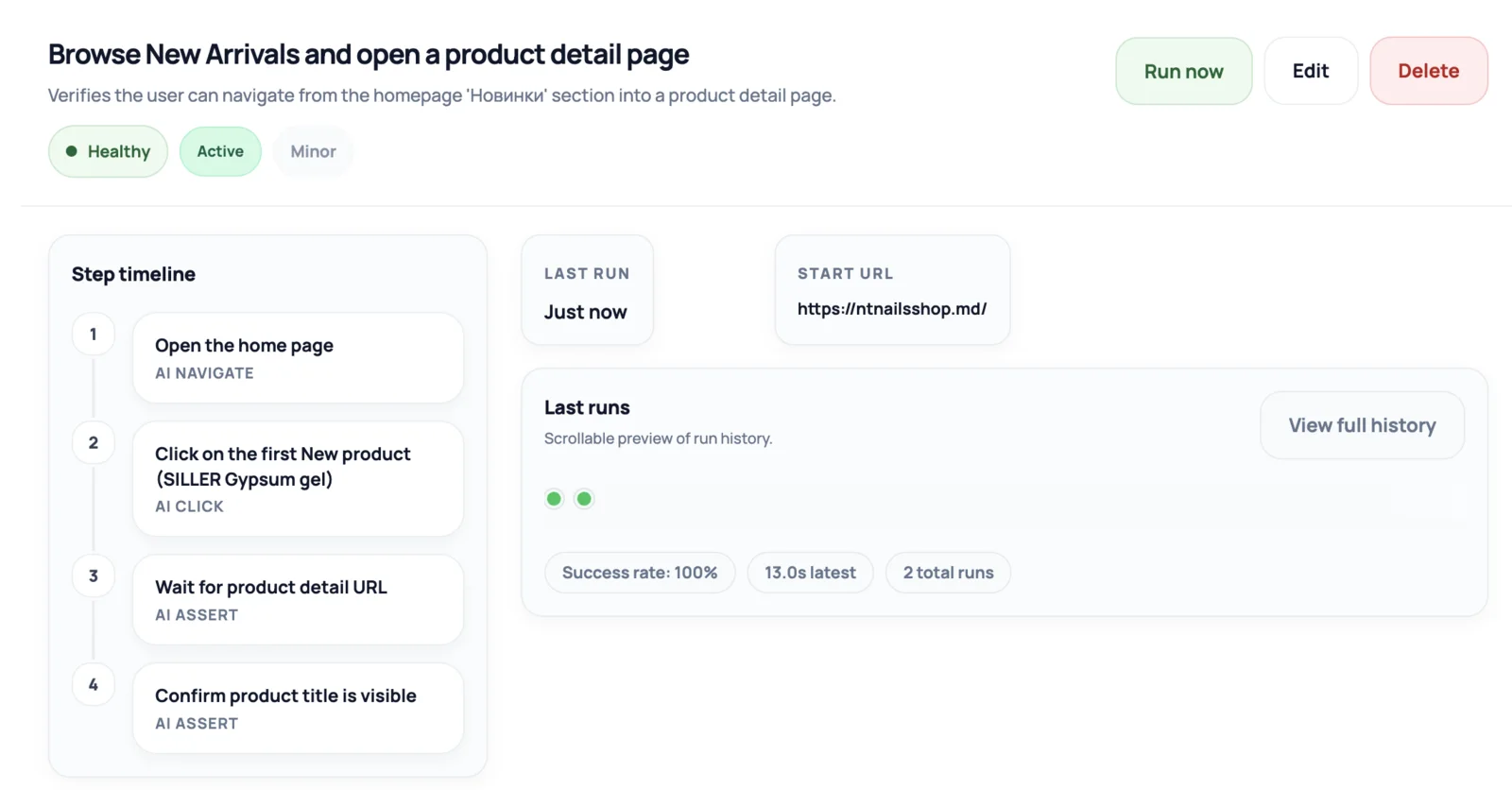
Headless Chromium runs structured flows like login, signup, search, add-to-cart, and checkout, with a step timeline and success rate.
NorthDuty AI suggests 2–5 journeys for your site; enable them in one click, or describe a flow in plain text and AI converts it into validated steps.
Before a flow runs, NorthDuty validates every selector in a real browser and rewrites or drops steps it cannot resolve, so flows are reliable rather than brittle.
Each monitored journey keeps a step timeline, last-run details, and a success rate.
See which step failed, how long the run took, and the latest success rate — so a multi-step failure is easy to understand.
A simple ping tells you the server answered. Synthetic monitoring goes further by acting like a browser — and, for multi-step journeys, like a user — so you find the failures that only appear when a page actually renders or a flow is actually attempted.
NorthDuty's health checks run in a real browser every 5 minutes by default, capturing JavaScript errors, failed resources, blank-page conditions, and the first-party API calls a page depends on. Its user journeys go a step further: headless Chromium executes structured steps such as login, search, add-to-cart, and checkout, and reports a step-by-step result.
Most revenue-affecting failures are experience failures, not full outages.
From single-page rendering to full multi-step journeys.
Each check loads the page in real Chromium and records front-end and API behavior, not just the response code.
Enable AI-suggested journeys or describe your own in plain text; AI converts the description into validated steps.
Headless Chromium runs each step; pre-flight validation keeps selectors honest so runs reflect real behavior.
Failed runs report the failing step; AI repair proposes corrected steps or a user-facing failure reason.
Explore pricing, feature details, solution pages, and related tools connected to this website monitoring use case.
Pricing
NorthDuty plans are sized by how many checkout, signup and login journeys you monitor: Free, $29 Starter, $79 Pro, $199 Business. 7-day trial, no card.
Compare pricing plansHub
Explore NorthDuty features: coverage-aware AI journeys, a cross-site workspace overview, website health checks, and connected incident response.
Browse FeaturesHub
Explore NorthDuty solutions for ecommerce website monitoring, SaaS website monitoring, agency website monitoring, and startup website monitoring.
Browse SolutionsFeature
NorthDuty runs your checkout, signup, login and form flows in a real browser on a schedule and reports the exact step that failed, with a screenshot.
Explore User Journey MonitoringFeature
Monitor uptime every 5 minutes by default with HTTP, SSL, DNS, blank-page detection, broken resources, JavaScript errors, and API call tracking.
Explore Uptime MonitoringFeature
Monitor login flows with NorthDuty user journeys so authentication pages, forms, JavaScript, APIs, and account-access steps keep working.
Explore Login MonitoringAnswers to common questions about this monitoring feature and when teams should use it.
Synthetic monitoring proactively simulates user activity against a site on a schedule — from rendering a page in a real browser to executing a multi-step flow — so failures are caught before real users report them.
No. Uptime monitoring confirms the site answered. Synthetic monitoring simulates the actual experience, which catches broken pages and failed multi-step journeys that an uptime check cannot see.
No. NorthDuty AI suggests journeys you can enable in one click, or you can describe a flow in plain text and AI converts it into validated browser steps.
The run is marked failed at the step that broke. When repair is enabled, NorthDuty re-engages AI to propose corrected steps or write a clear failure reason.
Use NorthDuty for synthetic monitoring that renders pages and runs real user journeys — without maintaining scripts.
7 days with Pro features and limits, no credit card — then keep one daily journey on the free plan.