But a homepage is not one file. A typical WordPress homepage pulls in dozens of images, scripts and stylesheets, and any of them can be missing while the page itself still returns 200. So I asked a narrower question: how often does a WordPress homepage load "successfully" while some of its own files fail? And when they do, does anyone actually notice?
To find out, I analyzed 10,000 WordPress homepages from the public HTTP Archive mobile crawl of 1 September 2026. Then I opened a sample of the flagged sites in a real browser.
On 1,088 of the 10,000 homepages (10.9%), the page loaded with HTTP 200 while at least one of the site's own images, scripts or stylesheets returned an error. But a third of those were only a missing favicon. When I opened 285 of the flagged homepages in a phone-sized browser, I found one visible problem: a broken thumbnail.
I am not naming any of the sites. The aggregate data and the full method are below.
The numbers
| Measure | Result |
|---|---|
| WordPress homepages analyzed | 10,000 |
| Homepages with at least one failed file of their own | 1,088 (10.9%) |
| Failed file requests on those homepages | 3,511 |
| Flagged only because of a missing favicon | 356 |
| Flagged only because of crawler blocks (403/429) | 92 |
| Homepages with a real broken image, script or stylesheet | 640 (6.4%) |
| ...of which a broken script or stylesheet | 360 (3.6%) |
| Flagged homepages opened in a browser | 285 |
| Visible damage confirmed in the browser | 1 |
"Failed file" means a request to the site's own domain for an image, script or stylesheet that returned HTTP 400–599. Third-party ads, fonts and trackers are not counted.
Then I sorted out the noise
When I looked at what had actually failed, two kinds of "failure" stood out as mostly harmless:
- Missing favicons. On 356 homepages, the only failed file was a site icon, usually
/favicon.ico. Browsers request that file automatically when a page doesn't declare an icon. A missing favicon is a small gap in a browser tab, not a broken page. - Crawler blocks. On 92 homepages, the only failures were HTTP 403 (forbidden) or 429 (too many requests). These usually come from firewalls or rate limits reacting to an automated crawler. A normal visitor may never see them.
That's 448 of the 1,088 flagged homepages, or 41%.
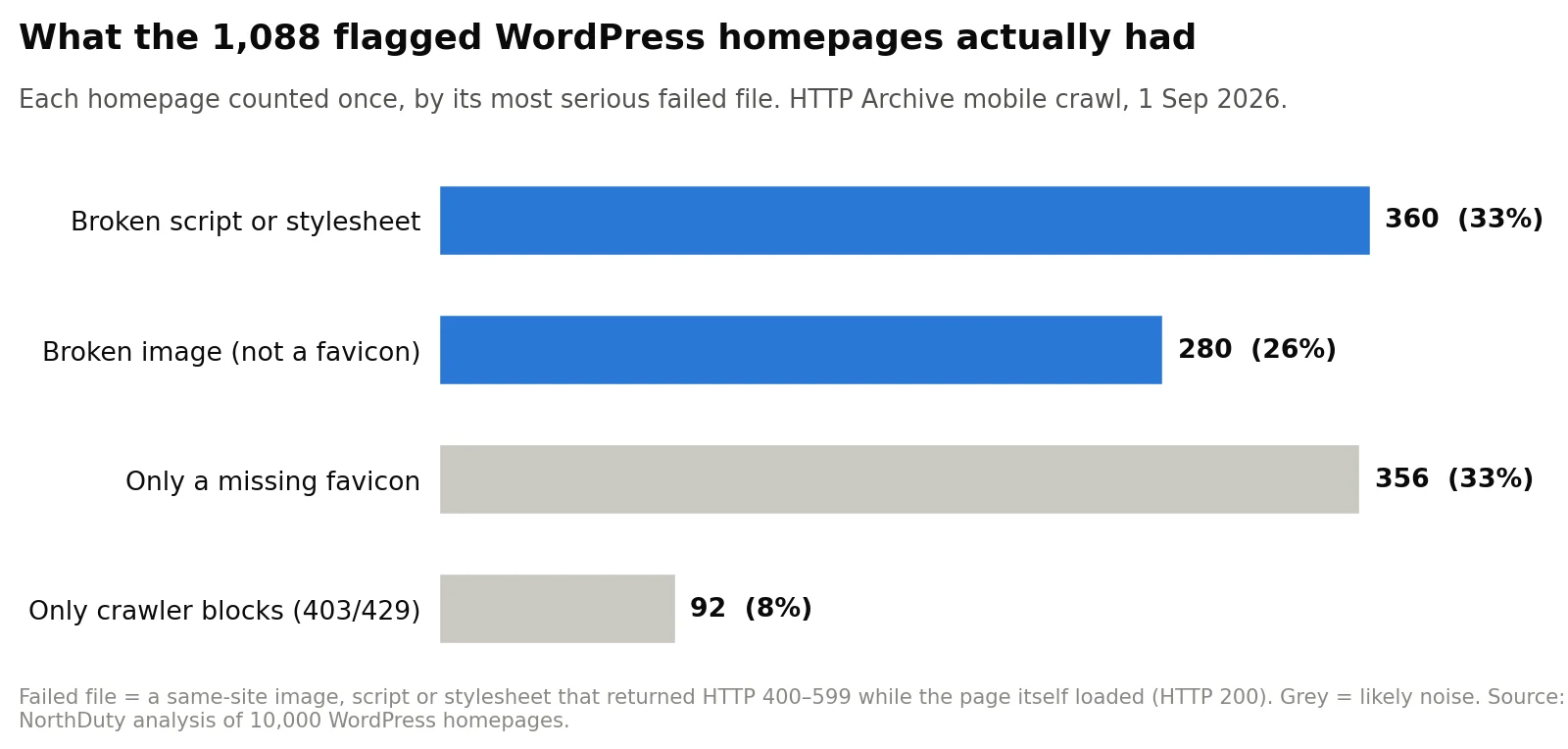
What's left is more meaningful. 640 homepages (6.4% of the 10,000) had a real broken image, script or stylesheet. Of those, 360 (3.6%) had a broken script or stylesheet, the kind of file that controls how a page looks and behaves.
The failures were also concentrated. Two-thirds of the flagged homepages (730) had exactly one failed file, while just 50 sites produced more than half of all 3,511 failed requests. One site alone produced 168. If you count failed requests, a handful of badly broken sites drowns out everyone else, which is why I report homepages, not requests.
Where the broken files lived
Leaving out favicons and crawler blocks, I sorted each broken file by where it sat in the site:
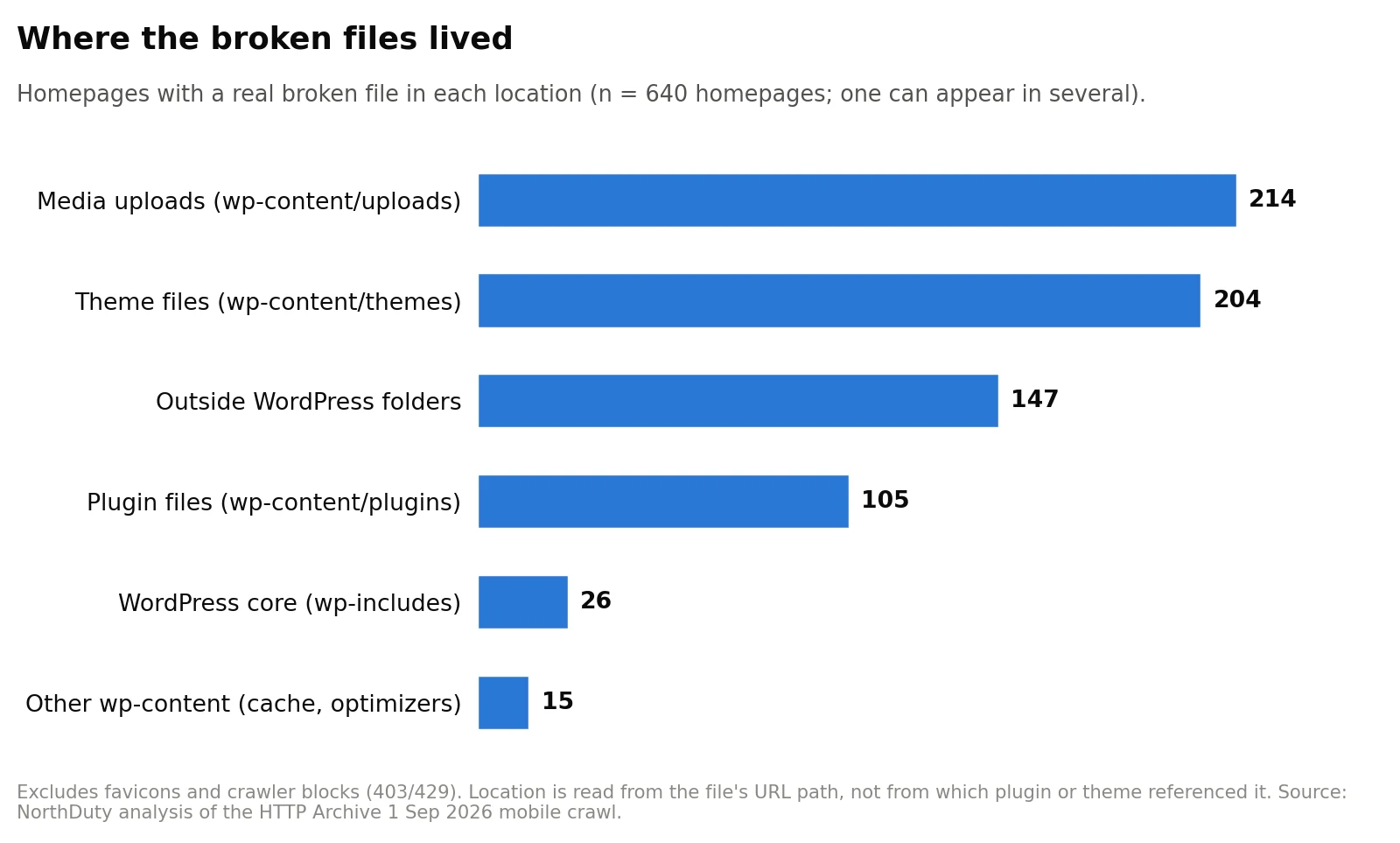
- Media uploads (
wp-content/uploads): 214 homepages. This isn't only old posts losing their images. Among homepages missing an upload from a dated folder, more than half (83 of 159) were missing a file uploaded in 2024 or later. - Theme files (
wp-content/themes): 204 homepages. Themes reference images, fonts, scripts and stylesheets by path, and when a theme is updated, replaced or customized, those references can outlive the files. - Plugin files (
wp-content/plugins): 105 homepages. There was no single culprit. The failures were spread across 87 different plugin folders, and no plugin appeared on more than 13 sites. - WordPress core (
wp-includes): only 26 homepages.
The location only tells you where a missing file should have been, not what referenced it or why it disappeared. Media cleanup tools, migrations, CDN rewrites and theme changes are all plausible causes, but this data can't tell them apart.
Did visitors notice?
A failed request in a crawl is not the same as a broken page for a person. So I drew a stratified sample of 285 of the 1,088 flagged homepages and opened them on 18–19 October 2026, about seven weeks after the crawl. I used a phone-sized browser window (390 × 844). The checks were read-only: scroll, open the main menu, follow one ordinary link. No forms, logins, searches or purchases.
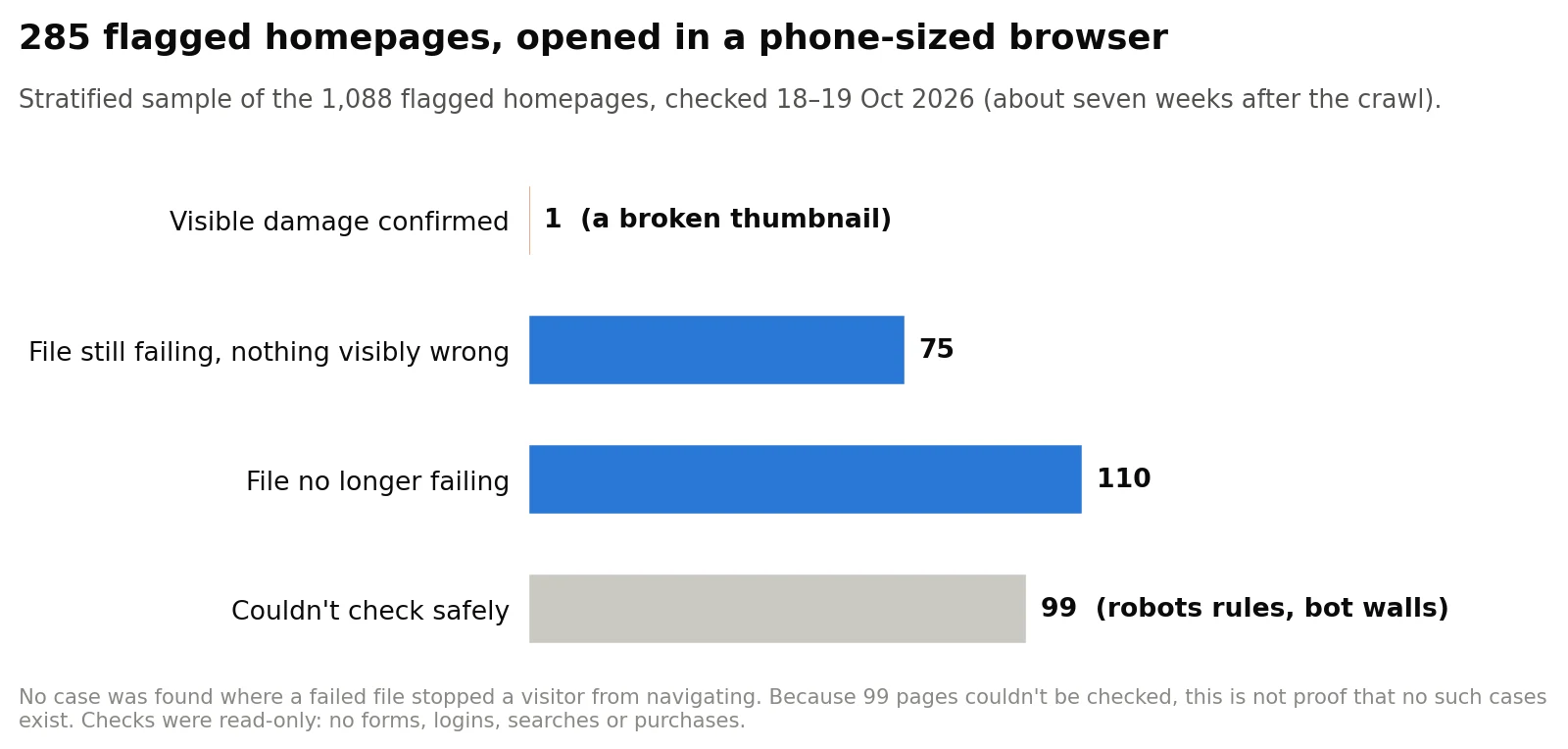
- 1 homepage showed visible damage: a content thumbnail displayed a broken-image icon because the same image still returned 404. The link it belonged to still worked.
- 75 homepages were still requesting the same failed file, yet nothing looked wrong.
- 110 homepages no longer showed the failure. Some had been fixed or were temporary. But 63 of them were favicon-only cases, where my browser may simply not have asked for the icon.
- 99 homepages couldn't be checked safely. Their robots rules didn't allow it, they showed a bot challenge or a blocking pop-up, they had no safe link to follow, or the result was ambiguous.
In the checks I ran, I found no case in which a failed file stopped someone from using the page. That's not proof that no such cases exist: weighted to the full flagged group, about 35% remained unchecked. But among the pages I could check, a failed request almost never became something a visitor could see.
That held even for broken scripts and stylesheets. Of the 93 sampled homepages in that group, 39 were still requesting the same failed file seven weeks later, and none of them looked broken. The likely explanation is that many of these files are leftovers the page no longer needs. They still cost a wasted request on every visit, which is a reason to clean them up rather than to panic.
One more pattern: the most popular sites were less likely to be flagged. Homepages in HTTP Archive's top-10,000 bucket were flagged 6.8% of the time (22 of 324), compared with about 11% for the rest. That group is small, so treat this as a hint, not a finding.
Check your own site in five minutes
- Open your homepage in Chrome, press F12, open the Network tab and reload. Type
status-code:404in the filter box, then trystatus-code:500. Anything listed from your own domain is a broken file. - Set a Site Icon (under Site Identity in the Customizer; block themes can set it from the Site Logo block). WordPress then declares the icon in the page, and browsers stop guessing at
/favicon.ico. - Look at the path of each broken file.
wp-content/themes/...points to your theme or child theme.wp-content/uploads/...points to a deleted or moved media file.wp-content/plugins/...points to a plugin, possibly one you've removed. - Remove dead references instead of ignoring them. If nothing visibly breaks, the file may be unused, but the browser still requests it on every visit.
- Check 403 and 429 errors on your own files. If your firewall blocks automated visitors from your CSS or JavaScript, make sure it isn't also blocking services you depend on.
If you monitor sites professionally, the lesson is about prioritizing alerts. A failed favicon and a failed checkout script are both "a 4xx on a page that returned 200", but they are not the same problem. Alerts are most useful when they separate likely noise (favicons, crawler blocks) from failures that repeat and affect scripts and stylesheets, and when someone confirms the impact before calling a page broken. I wrote more about that in how to reduce false alarms in website monitoring.
What this study doesn't show
- It doesn't show that 11% of all WordPress sites are broken. It measured failed file requests on 10,000 homepages from HTTP Archive's popularity buckets, not a random sample of every WordPress site.
- It doesn't cover inner pages, desktop layouts, or files from third-party domains.
- It doesn't blame WordPress core, or any plugin, theme or host.
- The browser checks happened seven weeks after the crawl, so they show later versions of the sites.
- It gives no precise "blocker rate" or "false-positive rate". Too many sampled pages couldn't be checked for that.
Method
Data. HTTP Archive tables crawl.pages and crawl.requests, crawl of 1 September 2026, mobile, homepages only. A page counted as WordPress when HTTP Archive's technology detection listed WordPress.
Sample. HTTP Archive groups sites into popularity buckets. I took all 7,776 WordPress homepages ranked in the top 100,000, plus 12,500 from the top-1-million bucket in a fixed pseudo-random order. After removing duplicates and four pages with no main document, I selected 10,000 sites with a seeded, documented ordering, so anyone can reproduce the same set. It is not a probability sample of all WordPress sites. Intervals I quote describe noise within this sample only: 10.3–11.5% for the flagged share, 5.9–6.9% for real broken files, and 3.3–4.0% for broken scripts or stylesheets.
Rules (written down before the analysis). A homepage was included only if it had exactly one main page response, with HTTP 200. It was flagged if at least one image, script or stylesheet on the same registrable domain (matched with the Public Suffix List) returned HTTP 400–599. HTTP 403 and 429 were marked in advance as likely crawler blocks and are reported separately.
Added afterwards to explain the result. I split the flagged homepages into favicon-only, crawler-block-only, image and script/stylesheet groups, and sorted broken files by URL path. These splits don't change the headline number. A favicon is any .ico file, a path containing favicon or apple-touch-icon, or a WordPress Site Icon crop.
Browser checks. I drew 285 of the 1,088 flagged homepages proportionally across four groups (crawler-block-only or not, top-100,000 or top-1-million) and fixed the list before opening any page. Chromium ran at 390 × 844 and respected robots rules. It recorded network traffic, matched the exact failed URLs from the crawl, and saved screenshots. Allowed actions were dismissing up to two ordinary pop-ups, scrolling up to three screens, opening the main menu and following one ordinary same-site link. No forms, searches, logins, downloads, carts, age gates or challenge-solving. Pages left unclear by navigation problems were rechecked twice under the same limits. Pop-ups, timeouts and challenges were never counted as broken without evidence linking them to the failed file.
Disclosure. I run NorthDuty, which sells website and user-journey monitoring, so I have an interest in "broken" sounding alarming. That's why the noise, the limits and the low visible-damage count are all spelled out above.
Using this data
- Data: aggregate CSV
- Chart: results chart (PNG, 1600 × 764)
- Licence: CC BY 4.0. Reuse it freely with credit to NorthDuty.
- Citation: NorthDuty, "About 1 in 10 WordPress Homepages Load With Broken Files. I Checked Whether Visitors Would Notice," HTTP Archive crawl of 1 September 2026, browser checks 18–19 October 2026.
- One-line summary: "In a NorthDuty analysis of 10,000 WordPress homepages from the September 2026 HTTP Archive crawl, 10.9% loaded with at least one failed first-party image, script or stylesheet. A third of those were only missing favicons, and browser checks of 285 flagged sites confirmed one visible defect."
Journalists and editors: the exact queries, the analysis code and the page-level evidence are available on request, and I'm happy to walk you through them. Get in touch.