The button disappears
A design change or CMS update removes the call to action from the visible page.
Broken buttons are easy to miss and expensive to ignore. A page can stay online while the button that drives signup, checkout, or lead generation quietly stops working.
Start your 7-day trial — no credit card, free plan after.
Why broken buttons slip past uptime checks — and how to catch them.
A broken button is not always obvious in analytics right away. The page still loads, the traffic still arrives, and the campaign may keep running. Meanwhile, visitors can no longer move to the next step.
This happens after releases, style changes, JavaScript issues, CMS edits, and third-party script conflicts. Because the page is technically online, the problem often escapes basic uptime checks.
Start by identifying the buttons tied directly to revenue or lead flow. That could be Add to Cart, Start Free Trial, Request Demo, Submit, Book Now, or Checkout.
Then monitor the page with step-by-step customer actions in a real browser. A journey that clicks the button fails at that step, with a screenshot, if the button disappears, stops responding, or no longer leads to the right outcome.
JavaScript error monitoring is also important because front-end issues often break button behavior without removing the element from the page.
These are common ways a button can fail while the page still looks mostly live.
A design change or CMS update removes the call to action from the visible page.
Users can click it, but nothing happens because a front-end error blocks the action.
A route change or bad link configuration pushes visitors into a broken step.
The button works, but the journey still breaks because the form, cart, or next page does not load correctly.
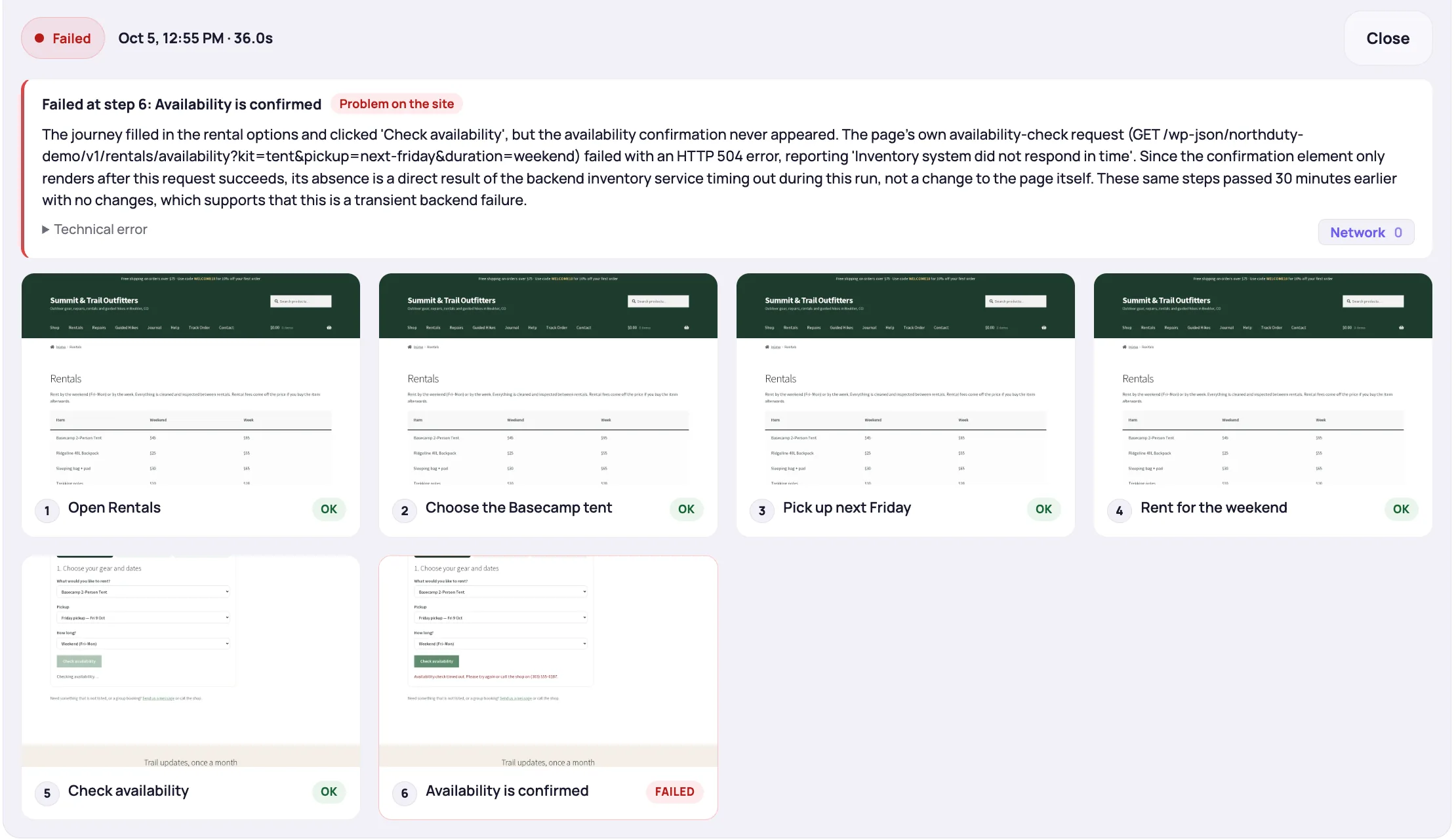
Treat key calls to action as part of your monitoring program, not just your design system.
A click that registers proves nothing. Each of these checks is only useful if it asserts on a state that cannot exist unless the button actually worked.
| Button | Why it earns a check | Assert on |
|---|---|---|
| Add to cart | The first step of every order; breaks on variable products and after plugin updates | The cart count incrementing, or the product appearing in the cart drawer |
| Checkout / Place order | The order itself, and the most expensive thing to lose | The order-received page, or the payment step loading with the right total |
| Start free trial / Sign up | New revenue, and usually the busiest CTA on the site | The signup form appearing, or the account-created state |
| Log in | Everything behind the account depends on it | An element only a signed-in session renders — not just the redirect |
| Mobile menu toggle | Most traffic is mobile, and this control breaks on its own | The navigation panel being visible at a phone viewport |
| Pricing plan selector | The step between interest and purchase | Checkout loading with the correct plan preselected |
| Send / Submit on the main form | Lead flow stops silently when it fails | The exact confirmation text, or the thank-you URL |
| Download or resource link | Gated content and lead magnets fail quietly | A 200 on the file and the expected content type |
Buttons are usually tested at the moment they are built, and they usually break later. A plugin update changes the markup, a content editor replaces the block, a tag-manager container adds a script that throws before the click handler binds. None of those events is a deploy, so none of them triggers a test run.
They also break selectively. A button that works on a desktop browser can be unclickable on a phone because an overlay sits on top of it, or dead in Safari because of one unsupported API. Anyone checking the site on their laptop sees a working page, which is exactly why the report usually arrives from a customer instead.
And they look correct while being broken. Visual QA — human or automated — confirms the button is present, the right colour and in the right place. The failure is in behaviour, not appearance, so the only check that finds it is one that clicks and then looks for what should happen next.
Broken buttons are one of the clearest examples of a website failing without going fully offline. They reduce conversions quietly and often go unnoticed until the business feels the drop.
NorthDuty helps teams detect broken buttons by combining change detection, journey monitoring, and website health monitoring on the pages where conversions matter most.
Keep exploring the feature pages and commercial routes connected to this topic.
Feature
NorthDuty runs your checkout, signup, login and form flows in a real browser on a schedule and reports the exact step that failed, with a screenshot.
Explore User Journey MonitoringFeature
Run checkout and lead forms in a real browser on a schedule. Get the failed step and a screenshot when submission breaks. One daily journey is free.
Explore Form MonitoringFeature
Monitor JavaScript errors and exceptions from a real browser on a schedule — no SDK on your site. See which page broke, when, and what the browser reported.
Explore JavaScript Error MonitoringArticle
How to monitor website forms end to end — contact, lead, quote and checkout — so a failed submit, broken validation or missing field is caught in minutes.
Read How to Monitor Website FormsPricing
NorthDuty plans are sized by how many checkout, signup and login journeys you monitor: Free, $29 Starter, $79 Pro, $199 Business. 7-day trial, no card.
Compare pricing plansMore NorthDuty guides on related website monitoring topics.
Article
How to set up a public status page for your website: what to include, how to manage incidents, and how to schedule maintenance so customers stay informed.
Read How to Set Up a Public Status PageArticle
How to monitor website uptime properly: check intervals, locations, false alarms — and the failures that return HTTP 200 so uptime checks never see them.
Read How to Monitor Website UptimeArticle
Learn why websites can break without going fully offline and how website health monitoring helps detect silent failures.
Read Why Websites Break Without Going OfflineShort answers that summarize the practical takeaways from this guide.
The state that only exists if the button worked — the cart count incrementing, the checkout page loading, a signed-in element appearing, the confirmation text. Asserting that the click registered proves nothing, because the click still registers when the handler throws.
Because they usually break after the test, not during it: a plugin update changes the markup, an editor replaces the block, a tag-manager script throws before the click handler binds. None of those is a deploy, so nothing re-runs the test.
Use a combination of user journey monitoring, JavaScript error monitoring, and rendered health checks to catch missing buttons, dead clicks, and failed next steps.
Because the page can still look online and mostly normal, so basic uptime checks may not reveal that the key customer action is no longer working.
Monitor the buttons tied most directly to revenue or lead flow, such as Checkout, Start Trial, Request Demo, Add to Cart, and Submit.
Use NorthDuty to detect broken buttons, missing calls to action, and failed next steps before they quietly reduce conversions on your most important pages.
7 days with Pro features and limits, no credit card — then keep one daily journey on the free plan.