The Two-Sentence Definition
A journey is a sequence of steps a real person performs on your site: open a page, click, fill in fields, submit, and expect a specific result. Journey monitoring repeats that sequence automatically in a headless browser every few minutes (and after every deploy), records each step, and alerts you with the failing step, a screenshot, and the error when the expected result doesn't appear.
You may also see it called synthetic transaction monitoring, user flow monitoring, or synthetic monitoring. They describe the same idea: scripted or described customer actions, executed by a robot, against production.
Why Uptime Monitoring Isn't Enough
Uptime monitoring sends a request to a URL and checks the response code. If the server answers with a 200, the check is green. That is useful — it tells you the server and DNS are alive — but it says nothing about whether the page works.
Most of the failures that cost money today happen on pages that still return 200:
- A plugin update changes the checkout form and the payment step throws an error.
- A JavaScript bundle fails to load, so the "Add to cart" button does nothing.
- A form's backend starts returning 500, but only after the visitor clicks Submit.
- A login redirect loops, so returning customers never reach their account.
- A consent banner or chat widget covers the button customers need to click.
The homepage loads. The uptime monitor stays green. Revenue quietly stops until a customer — or a client — tells you.
| Uptime monitoring | Journey monitoring | |
|---|---|---|
| What it checks | The server responds to one URL | A customer can complete a multi-step action |
| How | HTTP request | Real browser: click, fill, submit, assert |
| Catches | Outages, DNS, SSL, timeouts | Broken checkout, dead buttons, failing forms, login loops, script errors mid-flow |
| Evidence on failure | Status code | Failing step, screenshot, error, run history |
| Typical cadence | Every 1–5 minutes | Every 5–15 minutes, plus after each deploy |
You still want both. Uptime tells you the site is reachable; journeys tell you it still does its job.
What a Journey Looks Like in Practice
Here is a checkout journey on a WooCommerce demo store, written the way you would describe it to a colleague:
- Open the product page for the insulated bottle and wait for the stock badge to load.
- Click "Add to cart", then go to the cart and click "Proceed to checkout".
- Fill in the shipping form with the test customer's details and choose the test payment method.
- Click "Place order".
- Expect the page to say "Thank you. Your order has been received."
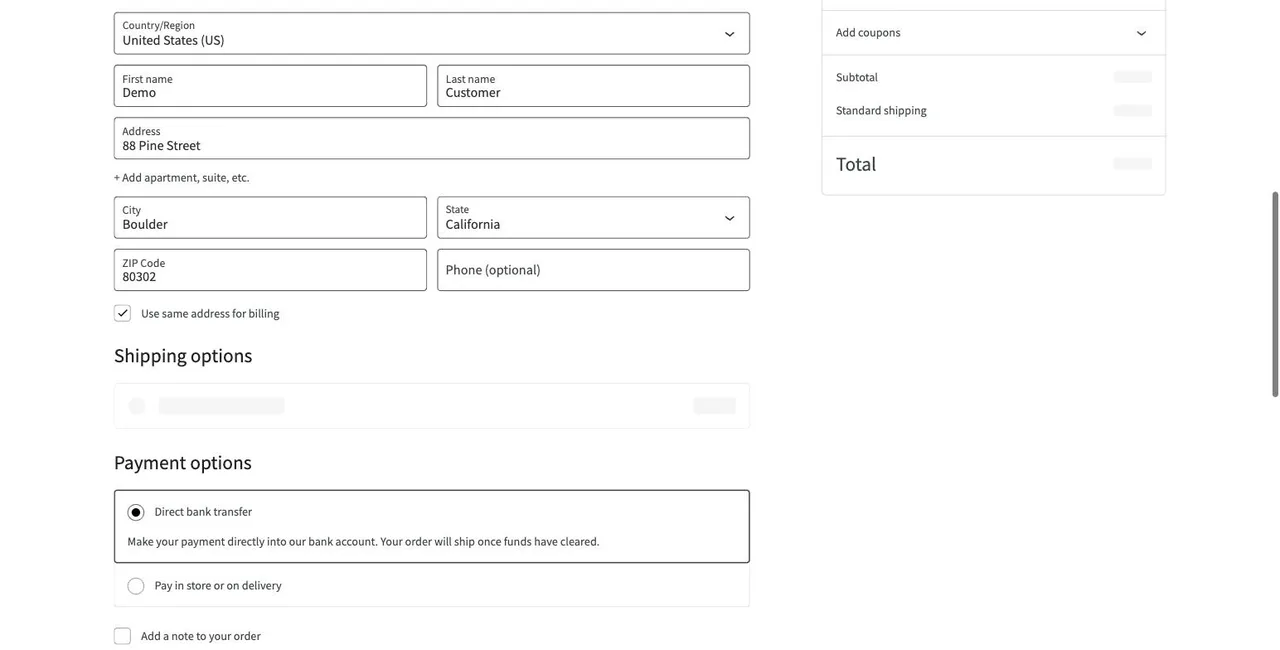
The last step is the important one. A journey passes only when the outcome happens — the confirmation text appears, the account dashboard loads, the "Thanks, we'll be in touch" message shows. A page that merely loads is not a pass.
When something breaks, the run stops at the failing step and keeps what the browser saw:
Which Journeys to Monitor First
Start with the flows where a silent failure costs money, access, or leads. For most sites that is three to five journeys, not fifty.
Ecommerce and WooCommerce stores
- Product page → add to cart → checkout → order confirmation (using a test payment method)
- Cart with a coupon code applied
- Customer account login
SaaS products
- Pricing page → start trial → signup form → welcome screen
- Login → dashboard loads with the user's data
- Password reset request
Lead-generation and agency client sites
- Contact or quote form → confirmation message (see form monitoring)
- Booking or demo-request form
- Newsletter signup behind paid campaigns
If you manage many client sites, the pattern repeats: the checkout journey and the main form on each site cover most of the revenue risk. See how agencies monitor client sites for how that scales.
How Journey Monitoring Works Under the Hood
Every journey monitoring tool does roughly the same four things:
- Launch a real browser. Usually headless Chromium, driven by Playwright or Puppeteer, so JavaScript, cookies, redirects, and third-party scripts behave the way they do for customers.
- Execute the steps. Navigate, click, type, select, wait for an element, press keys. Each step has a timeout.
- Assert the result. Check that specific text, an element, or a URL appears. Assertions are what turn a click-through into a test.
- Record and alert. Store timing and a screenshot per step, compare with previous runs, and notify the right channel when a step fails.
The differences between tools are in how you create journeys and how they cope with change.
Code-first tools give you a Playwright or Selenium script to write and maintain. Powerful, but every redesign means editing selectors, and someone on the team has to own the scripts. See how that model compares in Checkly alternatives and Uptrends alternatives.
Recorder tools capture your clicks in a browser extension. Faster to start, but recordings tend to break on small layout changes.
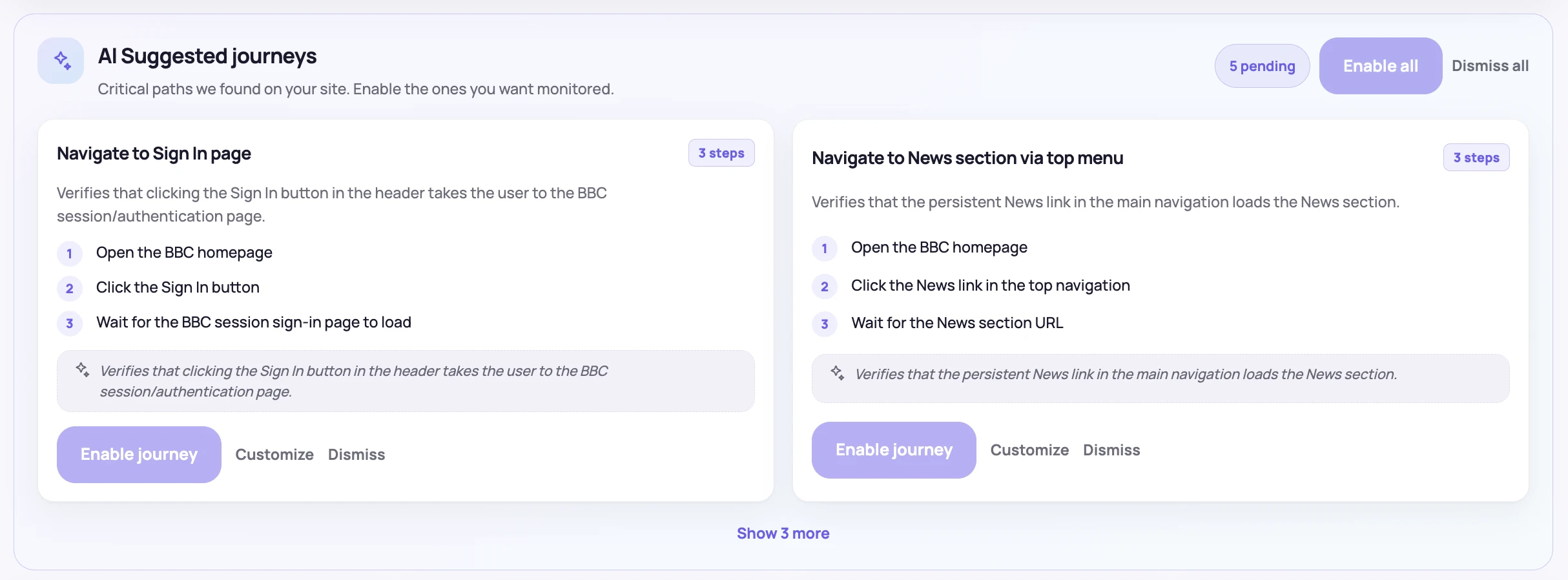
Described or AI-suggested journeys let you write the steps in plain English, or propose them from your URL. In NorthDuty, adding a site produces a few site-specific journey suggestions — for a store, browse to product, add to cart, checkout — each with its steps written out, so you enable the ones that matter instead of starting from a blank editor.
Handling Change Without Drowning in False Alarms
The biggest practical problem with journey monitoring is not setting it up; it is keeping it trustworthy. A journey that fails every time a button label changes gets muted, and a muted monitor catches nothing.
Three things keep journeys useful:
- Assert outcomes, not implementation details. "The order confirmation appears" survives a redesign; "the third div has class btn-2" does not.
- Repair intentional changes instead of failing on them. When a step no longer matches because the site changed on purpose, a good tool attempts to re-locate the element and reports what it changed. NorthDuty does this and tells you, so a redesign doesn't turn into a wall of alerts — and if it can't repair the step, the journey fails with a screenshot so you can update the description.
- Retry before alerting. A single network blip shouldn't page anyone. Confirm a failure on a second run before sending the alert. For more on this, see how to reduce false alarms in website monitoring.
How Often Should Journeys Run?
Cadence is a trade-off between detection time and cost. Each run is a real browser session, so journeys are heavier than a ping.
| Journey | Suggested cadence |
|---|---|
| Checkout on a store doing daily sales | Every 5 minutes |
| Signup and login on a SaaS product | Every 5–15 minutes |
| Lead or contact forms | Every 15 minutes to hourly |
| Low-traffic or brochure sites | Daily |
The window that matters most is right after a change. A scheduled run will find a broken release eventually, but customers use the broken version in the meantime. That is why journeys should also run on deploy: NorthDuty detects a release from a signed webhook, from changed asset hashes and build IDs, or — on WordPress — from plugin and theme updates via the NorthDuty Connect plugin, and re-runs every journey against the new version. More in post-deploy monitoring.
Running Checkout Journeys Safely on a Live Site
Monitoring a real checkout raises fair questions. The usual safeguards:
- Use test payment details. Stripe, PayPal, and most gateways have test modes or test cards; a dedicated low-cost test product or a 100% coupon works where test mode isn't available on production.
- Use a dedicated test account for login and account journeys, never a real customer's.
- Keep secrets out of step text. Passwords and card data belong in the tool's secret storage, not in journey descriptions, URLs, or alerts.
- Tag or clean up test orders so they don't pollute analytics, stock, or fulfilment.
- Only monitor sites you own or are authorized to test — for agencies, that means it is in the client agreement.
The WooCommerce checkout monitoring guide goes deeper on store-specific setup.
What a Useful Failure Alert Contains
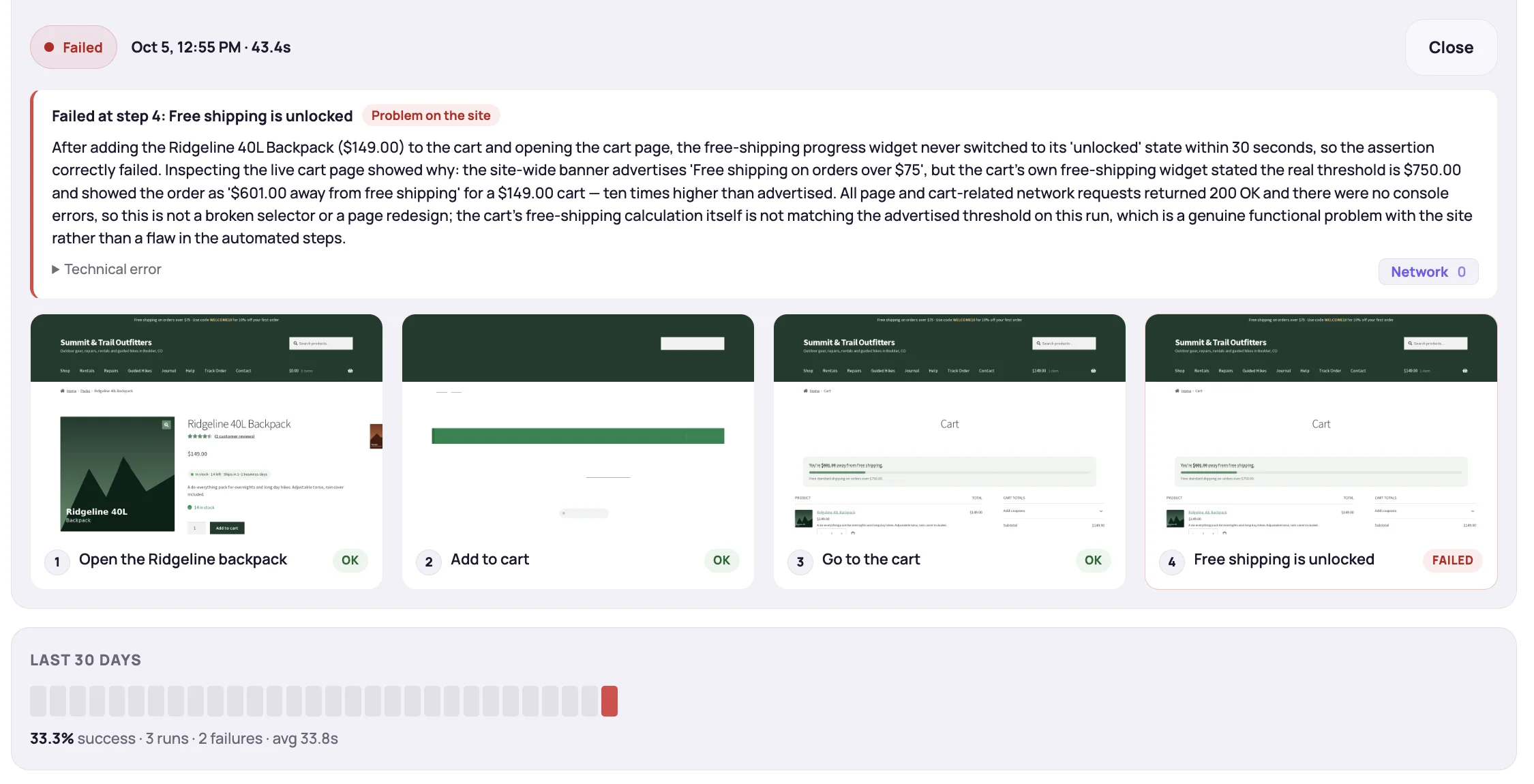
An alert that says "journey failed" sends someone on a hunt. A useful one answers the first three questions immediately:
- Which step failed — "Place order: expected confirmation text, got an error page".
- What the browser saw — a screenshot of that step.
- Is it new — the run history, so you can tell a fresh break from a flaky step.
Send journey alerts to the channel people actually watch — email is fine for a daily brochure-site check; checkout failures belong in Slack or SMS.
Build It Yourself or Use a Tool?
If you have engineers who already maintain a Playwright suite, running a few scripts on a GitHub Actions schedule is a legitimate start. The costs show up later: handling bot protection and Cloudflare challenges, screenshot storage, retries, alert routing, run history, and — above all — fixing selectors every time the site changes.
A monitoring tool makes sense when journeys need to be owned by people who don't write test code (agencies, ecommerce managers, marketers), when you watch many sites, or when you want deploy-triggered runs and evidence-rich alerts without building them.
Summary
Uptime monitoring proves the server answered. User journey monitoring proves customers can still check out, sign up, log in, and send the form — and when they can't, it tells you the exact step, with a screenshot, before a customer or client does. Start with the three to five journeys tied to revenue, run them every 5–15 minutes and after every deploy, assert outcomes rather than page loads, and route failures to a channel someone watches.
To see what this looks like on a real store, walk through the NorthDuty demo or read how journey monitoring works in the product.