Submit button stops working
The form looks fine, but a JavaScript error prevents the click from completing.
Website forms are small pieces of UI with large business impact. A contact form, demo request, quote form, newsletter signup, or checkout form can fail while the page around it still loads normally.
Start your 7-day trial — no credit card, free plan after.
Why forms fail silently — and how to confirm submissions actually go through.
Form failures often hide inside otherwise healthy pages. The submit button may be visible but inactive, validation may trap users, a required field may disappear, or the backend request may fail after the user clicks submit.
Because the page can still return a successful status code, basic uptime checks may not reveal that leads, support requests, or orders are being blocked.
Start with the forms closest to revenue or customer support: demo requests, contact sales, quote requests, checkout forms, booking forms, and account forms.
Monitor the page for uptime and health signals, then add user journey monitoring that fills the form and follows the submit path. The goal is to know whether the form is visible, usable, and able to reach the expected next state.
For production forms, use test-safe submissions or stop the journey before a real action if your workflow requires it. Even partial form monitoring is better than waiting for lead volume to drop.
These problems can reduce conversions without taking the site offline.
The form looks fine, but a JavaScript error prevents the click from completing.
A broken validation rule traps users even when the form data is valid.
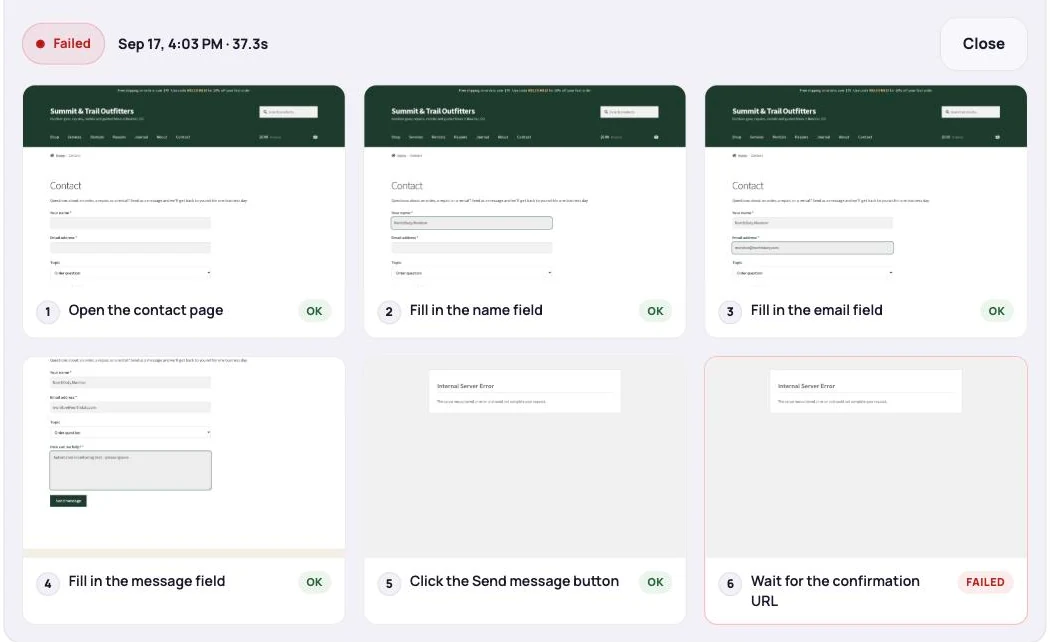
The browser submits the form, but the API or endpoint returns an error.
A content update or third-party embed issue removes the form from the page.
Monitor both the page and the action.
Every row here leaves the page returning HTTP 200. The difference between them is where in the chain the break happens — and that determines which check finds it.
| Failure | Where it breaks | The check that catches it | What the alert should say |
|---|---|---|---|
| Submit button does nothing | JavaScript on the page | Journey: fill the fields, click submit, assert on the confirmation | "No confirmation 10s after Send" |
| Validation rejects valid input | A front-end validation rule | Journey using a realistic test record | "Step 3 — email field flagged invalid" |
| Backend errors after submit | The server or form plugin | Journey that asserts on the success state, not on the click | "Internal Server Error on submit" |
| Form submits, the email never arrives | SMTP or deliverability | Journey plus a delivery check on the receiving inbox or webhook | "Submitted OK, nothing delivered in 15 min" |
| A field or the whole form disappears | A CMS edit, plugin update or broken embed | A journey that fails at the fill step, with a screenshot | "Element not found: email field" |
| Anti-spam blocks every visitor | A rotated key or a third-party script | Journey from a clean browser profile | "Blocked at verification step" |
| The thank-you page 404s | A permalink or redirect change | Journey that follows the flow past submit | "404 after redirect" |
The most common mistake in form monitoring is asserting on the click. A script that fills the fields, presses submit and then reports success because the click landed will pass happily while the server returns a 500 behind it — the click did happen, after all.
Assert on the state that only exists if the submission worked: the exact text of the confirmation message, the URL of the thank-you page, a success element that the error path never renders. Pick a string the error state cannot produce, and the check becomes trustworthy.
Then close the last gap. A form can accept a submission, show a perfect confirmation, and still deliver nothing, because delivery is a separate system from the form. If leads matter, pair the journey with a check on the receiving end — an inbox, a webhook, or a row appearing in the CRM — so "submitted" and "received" are verified separately.
Website form monitoring protects one of the most direct conversion points on many sites. The page can stay online while the business loses leads or requests.
NorthDuty helps teams monitor form pages with uptime, page health, and user journey checks that verify the next step still works.
Keep exploring the feature pages and commercial routes connected to this topic.
Feature
Run checkout and lead forms in a real browser on a schedule. Get the failed step and a screenshot when submission breaks. One daily journey is free.
Explore Form MonitoringFeature
NorthDuty runs your checkout, signup, login and form flows in a real browser on a schedule and reports the exact step that failed, with a screenshot.
Explore User Journey MonitoringSolution
Monitor client sites for broken checkouts and forms, blank pages, post-launch issues, and client-ready reports.
View For AgenciesArticle
Your landing page form says thank you, but the lead never reaches your inbox or CRM. The common causes, how to detect each, and how to monitor lead forms.
Read Lead Form Failure MonitoringArticle
Landing page monitoring that tests the conversion path itself — form submits and CTA links — so paid traffic never lands on a page that cannot convert.
Read How to Monitor a Landing PagePricing
NorthDuty plans are sized by how many checkout, signup and login journeys you monitor: Free, $29 Starter, $79 Pro, $199 Business. 7-day trial, no card.
Compare pricing plansMore NorthDuty guides on related website monitoring topics.
Article
How to set up a public status page for your website: what to include, how to manage incidents, and how to schedule maintenance so customers stay informed.
Read How to Set Up a Public Status PageArticle
How to monitor website uptime properly: check intervals, locations, false alarms — and the failures that return HTTP 200 so uptime checks never see them.
Read How to Monitor Website UptimeArticle
Learn why websites can break without going fully offline and how website health monitoring helps detect silent failures.
Read Why Websites Break Without Going OfflineShort answers that summarize the practical takeaways from this guide.
The state that only appears when the submission succeeded — the exact confirmation text, the thank-you URL, or a success element the error path never renders. Asserting that the submit button was clicked proves nothing: the click still happens when the server returns a 500 behind it.
Send every test submission to a tagged address such as leads+monitor@yourdomain.com and suppress or auto-archive it in the CRM. For forms that trigger something irreversible, stop the journey at the last safe step and assert on the form's ready state instead of submitting.
Monitor the form page for uptime and page health, and use user journey monitoring to fill the form and follow the submit path where safe.
Because the page can load successfully while the form action, validation, JavaScript, or backend request fails.
Start with demo requests, contact sales, quote forms, checkout forms, booking forms, login forms, signup forms, and support forms.
Use NorthDuty to monitor important website forms so broken submissions, missing fields, and failed next steps do not quietly reduce conversions.
7 days with Pro features and limits, no credit card — then keep one daily journey on the free plan.